
This is a Logitech Wireless Combo MK270 Quick Start Manual
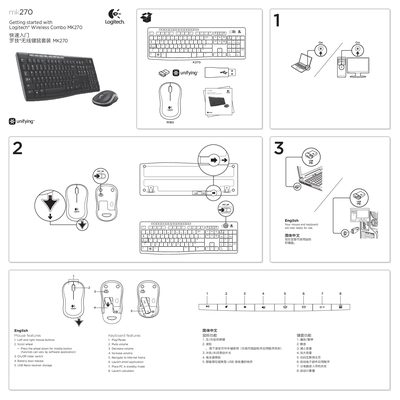
This guide helps you get the Logitech MK270 wireless combo up and running quickly. It describes the mouse and keyboard features, battery installation, and how to use the Logitech Unifying receiver.
Key sections include mouse features, keyboard shortcuts, step‑by‑step setup help, and instructions for pairing additional Unifying‑compatible devices. Battery requirements and troubleshooting tips are also provided.
| Mouse battery type | 1 AA alkaline battery |
|---|---|
| Keyboard battery type | 2 AAA alkaline batteries |
| Maximum devices per Unifying receiver | Up to 6 devices |
The mouse uses one AA alkaline battery.
Up to six devices can be paired with a single Unifying receiver.
Make sure the Unifying receiver is plugged in, download the Logitech Unifying software, and follow the on‑screen instructions to pair the device.