
Key facts
- Brand
- FrSky
- Model
- GR8
- Industry
- Industrial
- Documents
- 6
- Languages
- EN
- Last added
- 2023-10-15
Start here
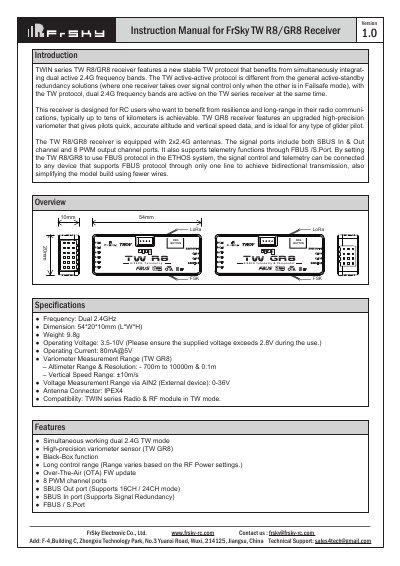
FrSky TW R8/GR8 Receiver Instruction Manual
This manual provides instructions for the FrSky TW R8/GR8 receiver, which features a new stable TW protocol utilizing dual active 2.4G frequency bands for high reliability and long-range communication. The TW GR8 model includes a high-precision variometer for altitude and vertical speed data, ideal for glider pilots. The device supports 8 PWM output channels, SBUS input/output, and telemetry via FBUS/S.Port.
Read onlineFrSky GR8 specifications
| Frequency | Dual 2.4GHz |
|---|---|
| Dimension | 54*20*10mm (L*W*H) |
| Weight | 9.8g |
| Operating Voltage | 3.5-10V |
| Operating Current | 80mA@5V |
| Antenna Connector | IPEX4 |
All FrSky GR8 documents by type
Day-to-day operation, settings and troubleshooting. Start here if the product is already set up.
Questions answered in these manuals
How do I register the receiver?
Enter the Model menu, select RF System, turn on the internal module, select TW MODE, and click Register.
What is the purpose of the OTA function?
The OTA function allows for Over-The-Air firmware updates after the receiver has been registered.
What is the purpose of the Black-Box function?
The Black-Box function preserves basic flight data, such as power and signal-related information.
What are the three failsafe modes available?
The receiver supports No Pulse, Hold, and Custom modes for handling signal loss.
How do you switch between FS (20ms) and HS (7ms) modes?
Go to the receiver [Options] in the transmitter menu and select 7ms PWM or not; the factory default is FS mode.
What happens if you do a binding operation while firmware upgrading?
You should not perform the binding operation in the near range while the firmware upgrading is in progress.