
Key facts
- Brand
- FrSky
- Model
- ASS70
- Category
- Other
- Industry
- Automotive
- Documents
- 3
- Languages
- ZH · EN
- Last added
- 2026-09-29
Start here
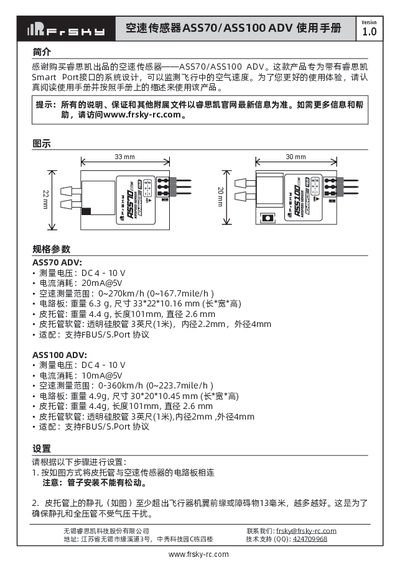
Frsky ASS70/ASS100 ADV Air Speed Sensor User Manual
The ASS70 and ASS100 ADV air speed sensors are designed for systems with Frsky Smart Port interfaces and measure airflow speed during flight. The manual introduces the product, its purpose, and the required safety precautions.
It covers connection of the pitot tube, recommended placement on the aircraft, wiring to the Smart Port, ID configuration via Free Link ETHOS, LED status indicators, and detailed electrical and mechanical specifications for both models. This manual is written in Chinese.
FrSky ASS70 specifications
| Measurement voltage (both models) | DC 4 - 10 V |
|---|---|
| Current consumption (ASS70) | 20mA@5V |
| Current consumption (ASS100) | 10mA@5V |
| Air speed range (ASS70) | 0~270 km/h (0~167.7 mile/h) |
| Air speed range (ASS100) | 0~360 km/h (0~223.7 mile/h) |
| Board dimensions (ASS70) | 33*22*10.16 mm |
| Board dimensions (ASS100) | 30*20*10.45 mm |
| Pitot tube length (both models) | 101 mm |
| Supported protocol (both models) | FBUS/S.Port |
All FrSky ASS70 documents by type
Day-to-day operation, settings and troubleshooting. Start here if the product is already set up.
Questions answered in these manuals
How can I change the sensor's ID?
You can change the ID using Free Link ETHOS on Windows, Android, or iOS.
Where should the pitot tube be placed on the aircraft?
The static hole of the pitot tube should extend at least 13 mm beyond the wing leading edge and avoid water, oil, or vibration‑prone areas.
What is the default physical ID for the sensor?
The default physical ID for this sensor is 10.
From: FrSky ASS-70/ASS-100 Air Speed Sensor Instruction Manual
Can the sensor ID be changed?
Yes, the ID number could be changed by FrSky Servo Channel Changer.
From: FrSky ASS-70/ASS-100 Air Speed Sensor Instruction Manual
What is the correct installation location for the airspeed sensor?
The tube should be placed on the leading edge of the wing several inches out from the fuselage, ensuring it is not directly in the plane's prop-wash.
From: FrSky ASS70/ASS100 ADV Airspeed Sensor Instruction Manual
Can FrSky Smart Port sensors be connected together?
Yes, all FrSky Smart Port enabled sensors can daisy chain with each other through their Smart Port.
From: FrSky ASS70/ASS100 ADV Airspeed Sensor Instruction Manual