
Key facts
Start here
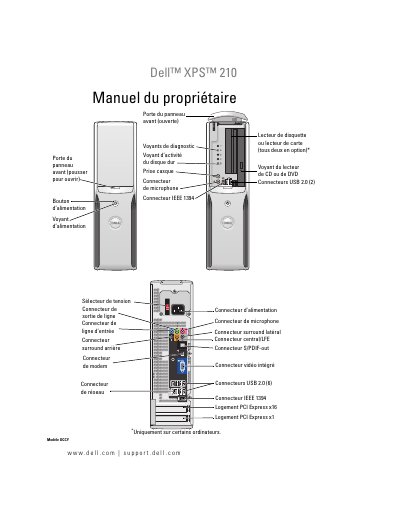
Dell XPS 210 Owner's Manual
This is the French owner's manual for the Dell XPS 210 desktop computer. It covers front and rear views, connecting monitors, printers, networks, Internet, CDs and DVDs, power management, and optional Intel Viiv technology.
It also provides troubleshooting guidance, diagnostic tools, instructions for removing and installing parts such as memory, drives, cards, modem, and battery, plus specifications, system setup, cleaning, and regulatory information. This manual is written in French.
Dell XPS 210 specifications
| USB 2.0 Connectors (Front) | 2 |
|---|---|
| USB 2.0 Connectors (Back) | 6 |
| IEEE 1394 Connector | 1 |
| VGA Connector | 1 |
| Modem Connector | 1 |
Source: Dell XPS 210 Service Manual
All Dell XPS 210 documents by type
Disassembly, diagnostics and part numbers, for repair.
Day-to-day operation, settings and troubleshooting. Start here if the product is already set up.
- Dell XPS 210 User's Guide 144 p
- Dell XPS 210 Owner's Manual 154 p
- Dell XPS 210 Owner Manual 150 p
- Dell™ XPS™ 210 136 p
Questions answered in these manuals
What should you do before turning off the computer to avoid losing data?
Save and close any open files and exit any open programs.
How long should you press the power button to turn off the computer if the operating system does not shut down?
Press and hold the power button for 4 seconds.
Where can I find drivers and documentation updates?
Drivers and documentation updates are available on support.dell.com, and documentation and drivers are already installed on the computer.
Where are the service tag and Windows product key labels?
The labels are on the computer.
Is the Drivers and Utilities CD included with every computer?
No, it is provided only with certain computers.
Where is the owner's manual available?
It is available in PDF format on support.dell.com.