
Dell XPS 210 User's Guide

Dell™ XPS™ 210 User's Guide
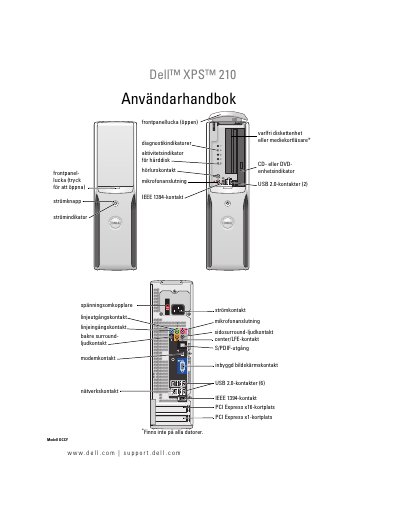

Dell XPS 210 User's Guide - cover page
Brand
DELL
Category
Desktops
Document type
User Manual
Language
SV
Pages
144
File format
PDF
File size
2.7 MB
Published
22 November, 2023
Updated
22 November, 2023
Model
XPS 210
MD5 checksum
EEDC50956EFED36F06739C022ABB4780

About this manual

Dell XPS 210 is a Dell computer. This user guide covers its front and rear views, connecting displays, printers, networks, and Internet, playing and copying CDs and DVDs, power management, and optional Intel Viiv features.

It also covers troubleshooting, Dell Diagnostics, drivers, restoring the operating system, removing and installing parts such as memory, cards, drives, modem, and battery, specifications, system setup options, cleaning, support policy, FCC notices, and contacting Dell. This manual is written in Swedish.

What's inside

  • Finding information
  • Setting up and using the computer
  • Troubleshooting
  • Troubleshooting tools
  • Removing and installing parts
  • Specifications
  • System setup program
  • Cleaning the computer
  • Contacting Dell
  • Index

Frequently asked questions

Where can I find drivers and documentation updates?

Drivers and documentation updates are available on support.dell.com, and documentation and drivers are already installed on the computer.

Where are the service tag and Windows product key labels?

The labels are on the computer.

What can I do with the Drivers and Utilities CD?

It can be used to reinstall drivers, run Dell Diagnostics, or read documentation.

Download PDF (2.7 MB)

More DELL Manuals


View all DELL manuals →