
Dell™ XPS™ 210 Owner's Manual
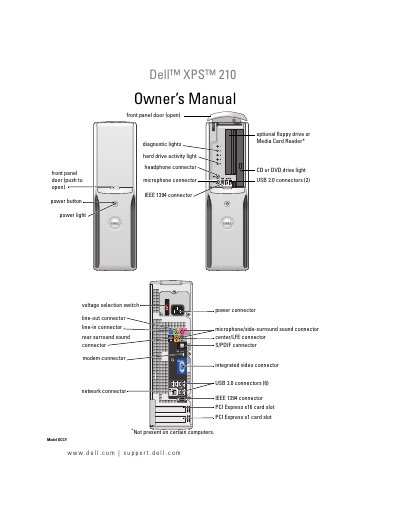
This Dell XPS 210 Owner’s Manual details how to set up the computer, showing front and back views, I/O connectors, and how to install components such as memory, drives, and optional devices.
It also includes troubleshooting sections, diagnostic tools, power management modes, and full technical specifications, along with support and warranty information.
| Processor types | Intel Pentium 4, Pentium D, Celeron D, Intel Core |
|---|---|
| Memory type | 533-, 667-, and 800- MHz DDR2 |
| Maximum memory | 4 GB |
| System clock speed | 533-, 800- or 1066- MHz |
| Video | Integrated Intel Graphics Media Accelerator X3000 |
| Audio | Internal 7.1 channel Intel High Definition Audio |
| NIC | 10/100-Mbps integrated network interface |
Use the Setup Diagram.
When to Use the Dell Diagnostics.
Processor types Intel Pentium 4, Pentium D, Celeron D, Intel Core; Memory 533-, 667-, 800- MHz DDR2; Maximum memory 4 GB.