
Key facts
Start here
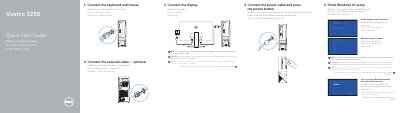
Dell Vostro 3250 Quick Start Guide
This quick start guide covers the initial setup of the Dell Vostro 3250, including connecting the keyboard, mouse, optional network cable, display, and power cable, then completing Windows 10 setup.
It also identifies the computer's features, such as the optical drive, USB connectors, VGA and HDMI connectors, memory-card reader, expansion-card slots, and diagnostic lights, and provides support, registration, and regulatory information.
Dell Vostro 3250 specifications
| Chipset | Intel H110 |
|---|---|
| Memory type | 1600 MHz DDR3L (non-ECC) |
| Maximum memory | 16 GB |
| Integrated video | Intel HD graphics |
| Discrete video | NVIDIA GEFORCE GT705 |
| Audio | Integrated 5.1 high-definition audio |
| Ethernet | 10/100/1000 Mbps |
| Wireless | Wi-Fi 802.11ac |
| Bluetooth | 4.0 |
| USB 3.0 speed | 5 Gbps |
| Drive bays | One 3.5-inch or Two 2.5-inch drive bays |
| Network connector | one RJ-45 connector |
All Dell Vostro 3250 documents by type
The shortest path to a working setup, usually only a few pages.
Day-to-day operation, settings and troubleshooting. Start here if the product is already set up.
Questions answered in these manuals
How should the display be connected if the computer has a discrete graphics card?
Connect the display to the discrete graphics card.
What should be entered when connecting to a secured wireless network?
Enter the password for the wireless network access when prompted.
Where can I find product support and manuals?
You can find support and manuals at Dell.com/support or Dell.com/support/manuals.
What should I do if I ordered the computer with a discrete graphics card?
You must connect the display to the discrete graphics card instead of the standard port.
What is the regulatory model of the Dell Vostro 3250?
The regulatory model is D13S.
What is the maximum memory capacity?
Maximum memory is 16 GB.