
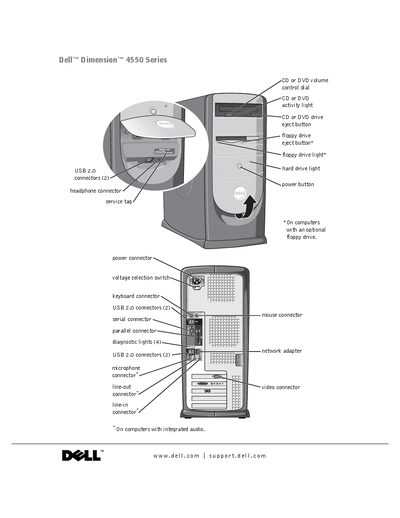
This document provides information about external connectors, ports, and slots on Dell Dimension 4550 series computers, including CD or DVD drive, floppy drive, hard drive, power, headphone, USB, keyboard, parallel, serial, network adapter, audio and diagnostic lights
This manual covers everything you need to set up and use your Dell Dimension 4550 Series desktop, including connecting peripherals, configuring the operating system, and installing optional components. It also includes safety instructions, ergonomic guidelines, and detailed troubleshooting steps.
Later sections explain how to add or replace parts such as hard drives, memory modules, and expansion cards, as well as how to use Dell Diagnostics and restore the system to a previous state.
The manual includes a section titled “Reinstalling Microsoft® Windows® XP” that walks you through the process.
The troubleshooting chapter lists “A solid blue screen appears” and provides diagnostic steps to resolve it.
Section 3 “Advanced Troubleshooting” explains how to start and use Dell Diagnostics to identify hardware issues.