
This manual provides setup, usage, troubleshooting, and safety instructions for the Dell Dimension 4550 Series desktop computer.
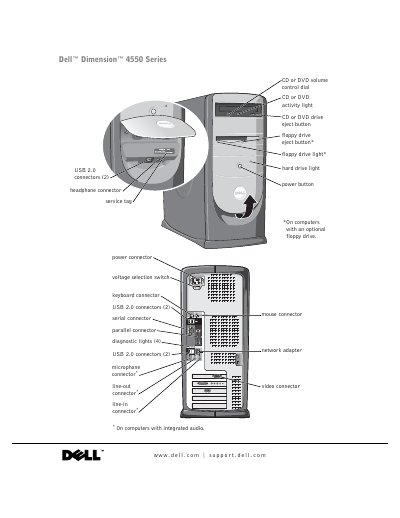
The Dell Dimension 4550 Series User Manual serves as a comprehensive guide for end-users to set up, operate, and maintain their desktop computer. It covers essential topics including connecting peripherals like printers and monitors, configuring network settings, and managing software drivers.
A significant portion of the document is dedicated to troubleshooting common hardware and software issues, such as drive problems, error messages, and system crashes. Additionally, it includes detailed instructions for advanced tasks like adding memory modules or replacing internal components.
| Microprocessor type | Intel Pentium 4 |
|---|---|
| L1 cache size | 8 KB |
| System clock data rate | 400- or 533-MHz |
| PCI bus speed | 33 MHz |
Refer to the section on solving general problems where specific steps for unresponsive programs are outlined.
The manual provides instructions in the appendix under 'Clearing Forgotten Passwords'.