
Key facts
Start here
Dell Chromebook 5190 2-in-1 Quick Start Guide
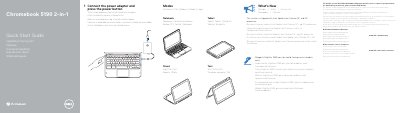
Two-page quick start guide for the Dell Chromebook 5190 2-in-1. It shows how to connect the power adapter and press the power button, and lists what is new, including the Intel Apollo Lake Celeron DC and QC processor, Notebook/Tablet/Tent/Stand modes, and Digitizer EMR pen support on world-facing camera models only.
The guide also identifies hardware features such as the camera, USB Type-C and USB 3.1 Gen 1 ports, microSD card reader, audio port, battery status light, power button, and service tag label. It provides Dell support, warranty, service contract, contact, and regulatory links, and lists regulatory model P28T, regulatory type P28T002, and computer model Chromebook 5190 2-in-1.
Dell Chromebook 5190 specifications
| Processor | Intel Apollo Lake Celeron DC and QC processor |
|---|---|
| USB Type-C | Power Delivery/DisplayPort |
| USB 3.1 Gen 1 port | USB 3.1 Gen 1 port |
| Card reader | microSD card reader |
| Audio port | Universal audio port |
| Security lock slot | Noble Wedge lock slot |
| Computer model | Chromebook 5190 2-in-1 |
All Dell Chromebook 5190 documents by type
The shortest path to a working setup, usually only a few pages.
Disassembly, diagnostics and part numbers, for repair.
Questions answered in these manuals
How do I turn on the Dell Chromebook 5190 2-in-1?
Connect the power adapter and press the power button.
What processor does the system ship with?
The system ships with an Intel Apollo Lake Celeron DC and QC processor.
What processor is included in the Chromebook 5190?
The system is shipped with Apollo Lake Celeron Dual Core and Quad Core processors.
Where can I find product support and manuals?
You can visit Dell.com/support or Dell.com/support/manuals.
What processor does the Chromebook 5190 2-in-1 use?
It is shipped with an Intel Apollo Lake Celeron DC and QC processor.
Does the Chromebook 5190 2-in-1 support a digitizer pen?
It supports a Digitizer EMR pen on world-facing camera models only.