
Key facts
Start here
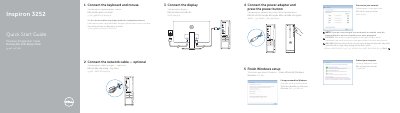
Dell Inspiron 3252 Computer Quick Start Guide
This Quick Start Guide helps users set up the Dell Inspiron 3252 computer. It covers connecting the keyboard, mouse, network cable, power adapter, and display, then finishing Windows setup, setting a password, connecting to a network, and protecting the computer.
The guide lists computer features including the optical drive, power button, hard-drive activity light, media-card reader, headset port, USB ports, audio ports, VGA port, HDMI port, power-adapter port, network port, and security-cable slot. Product support and manuals are available at dell.com/support, and the regulatory model is D14S.
Dell Inspiron 3252 specifications
| USB 3.0 ports | 2 |
|---|---|
| Audio ports | 3 |
| USB 2.0 ports | 4 |
| Computer model | Inspiron 3252 |
All Dell Inspiron 3252 documents by type
The shortest path to a working setup, usually only a few pages.
- Dell Inspiron 3252 Computer Quick Start Guide 2 p
- Dell Inspiron 3252 Quick Start Guide 2 p
- Dell Inspiron 3252 Quick Start Guide 2 p
- Dell Inspiron 3252 Quick Start Guide 2 p
- Dell Inspiron 3252 Quick Start Guide 2 p
- Dell Inspiron 3252 Computer Quick Start Guide 2 p
- Dell Inspiron 3252 Quick Start Guide 2 p
- Dell Inspiron 3252 Quick Start Guide 2 p
- Dell Inspiron 3252 Quick Start Guide 2 p
- Dell Inspiron 3252 Quick Start Guide 2 p
- Dell Inspiron 3252 Quick Start Guide 2 p
- Dell Inspiron 3252 Quick Start Guide 2 p
- Dell Inspiron 3252 Quick Start Guide 2 p
Disassembly, diagnostics and part numbers, for repair.
Questions answered in these manuals
How many USB 3.0 ports does the computer have?
The computer has 2 USB 3.0 ports.
How many USB 2.0 ports does the computer have?
The computer has 4 USB 2.0 ports.
What operating systems can be used to finish the setup?
The guide provides instructions for finishing setup using Ubuntu, Windows, or Linux.
What should be done if connecting to a secured wireless network?
You must enter the password for the wireless network access when prompted.
How do I finish operating system setup on the Dell Inspiron 3252?
Follow the instructions on the screen to finish setup.
Where can I find product support and manuals for the Dell Inspiron 3252?
Visit dell.com/support and dell.com/support/manuals.