
Key facts
Start here
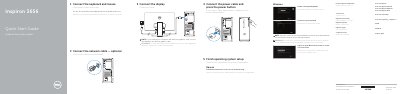
Dell Inspiron 3656 Quick Start Guide
This Quick Start Guide covers initial setup of the Dell Inspiron 3656 computer. It describes connecting the keyboard and mouse, optional network cable, power cable, and display, then completing Ubuntu or Windows operating system setup, including security and updates, network connection, and account sign-in.
The guide also lists the computer's features and ports, including USB, audio, VGA, HDMI, network, memory-card reader, and expansion-card slots, and lists Dell support and regulatory information.
Dell Inspiron 3656 specifications
| Regulatory model | D19M |
|---|---|
| Regulatory type | D19M001 |
| USB 3.0 ports | 2 |
| USB 2.0 ports | 4 |
| Audio ports | 3 |
| Optical drive | Optional |
All Dell Inspiron 3656 documents by type
Disassembly, diagnostics and part numbers, for repair.
The shortest path to a working setup, usually only a few pages.
Questions answered in these manuals
What tools are recommended for disassembling the computer?
The manual recommends using a Phillips screwdriver and a plastic spudger to perform the steps.
How do I discharge residual power before working on the computer?
After disconnecting all cables, you must hold down the power button for 5 seconds to drain residual electricity from the system board.
How do I connect the display on the Inspiron 3656?
Connect the display to the discrete graphics card if the computer was ordered with one.
What operating system setup options are covered?
The guide covers Ubuntu and Windows setup, including security and updates, network connection, and account sign-in.
Where should I connect the display if the computer has a discrete graphics card?
If the computer was ordered with a discrete graphics card, the display should be connected to that card.
Where should the display be connected if the computer has a discrete graphics card?
If the computer was ordered with a discrete graphics card, the display should be connected to that card.