
Key facts
- Brand
- ViewSonic
- Model
- PJ862
- Industry
- Electronics
- Documents
- 4
- Languages
- EN
- Last added
- 2012-06-04
Start here
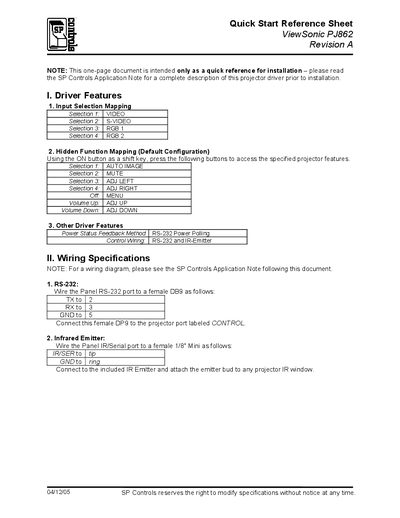
ViewSonic PJ862 Quick Start Reference
This one‑page Quick Start Reference provides the essential information needed to install the SmartPanel driver for the ViewSonic PJ862 projector. It lists the default input‑selection mapping, hidden function keys, and power‑status feedback methods.
Additional sections describe the RS‑232 and infrared wiring connections, default relay settings, lockout timer (81 seconds), and troubleshooting tips for power‑on self‑test, unexpected power‑off, and lockout mode behavior.
ViewSonic PJ862 specifications
| Lamp Power | 230W UHB (Ultra High Brightness) |
|---|---|
| Model Number | VS10461 |
| Noise Reduction Mode | WHISPER mode reduces acoustic noise |
All ViewSonic PJ862 documents by type
Day-to-day operation, settings and troubleshooting. Start here if the product is already set up.
The shortest path to a working setup, usually only a few pages.
Questions answered in these manuals
How do I reset the projector if it stops operating correctly?
Push the Restart switch with a cocktail stick, then let the projector cool for at least 10 minutes before turning it on again.
How should the RS‑232 connection be wired to the projector?
Connect the panel’s TX to pin 2, RX to pin 3, and GND to pin 5 of a female DB9, then plug the connector into the projector’s CONTROL port.
What is the default lockout timer setting?
The lockout timer is set to 81 seconds by default.
How do I reset the projector if it stops responding?
Press the Restart button and hold it for about 10 seconds; the projector will power cycle and resume normal operation.
What safety precautions should I follow when using the PJ862?
Do not use the projector near water, clean only with a dry cloth, and keep ventilation openings clear.
What should I do if the projector causes harmful radio or TV interference?
Reorient or relocate the receiving antenna, increase the separation between the equipment and receiver, or connect the equipment to a different circuit.