
This document is a quick reference sheet for the ViewSonic PJ862 projector, describing the features and functions of the driver, as well as the wiring specifications and connections.
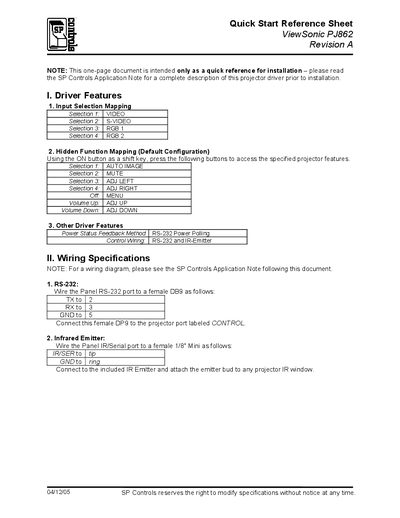
This one‑page Quick Start Reference provides the essential information needed to install the SmartPanel driver for the ViewSonic PJ862 projector. It lists the default input‑selection mapping, hidden function keys, and power‑status feedback methods.
Additional sections describe the RS‑232 and infrared wiring connections, default relay settings, lockout timer (81 seconds), and troubleshooting tips for power‑on self‑test, unexpected power‑off, and lockout mode behavior.
| Default Input Selections | VIDEO, S‑VIDEO, RGB1, RGB2 |
|---|---|
| Power Status Feedback Method | RS‑232 Polling |
| Infrared Emitter Wiring | IR/SER to tip, GND to ring |
| Lockout Timer | 81 seconds |
| Inactivity Shutdown | Disabled |
Connect the panel’s TX to pin 2, RX to pin 3, and GND to pin 5 of a female DB9, then plug the connector into the projector’s CONTROL port.
The lockout timer is set to 81 seconds by default.
Press and hold the On button while pressing the indicated key (e.g., AUTO IMAGE, MUTE, ADJ LEFT, ADJ RIGHT).
Verify that power is correctly connected and that polarity is correct.