
Key facts
- Brand
- Nikon
- Model
- D7000
- Category
- Digital cameras
- Industry
- Electronics
- Documents
- 4
- Languages
- EN · ES · JA
- Last added
- 2012-06-08
Start here
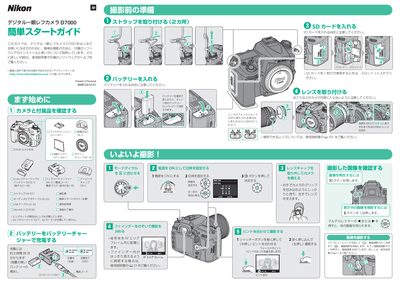
Nikon D7000 Quick Start Guide
This guide introduces the Nikon D7000 digital SLR for beginners, showing how to insert the EN‑EL15 battery, select the appropriate focus mode (A or M/A), and use the SD‑card slot for storing photos and videos. It also explains basic shooting controls such as the shutter button, multi‑selector, and LCD monitor operation.
The second part walks you through installing the bundled ViewNX 2 software from the CD‑ROM, connecting the camera to a PC via USB or a card reader, and using Nikon Transfer 2 to import, edit, and print images and video clips. This manual is written in Japanese.
Nikon D7000 specifications
| ISO range | 100‑6400 |
|---|---|
| Maximum continuous release | 100 fps |
| Firmware version | 1.0 |
| Bit depth | 14 (landscapes), 12 (others) |
Source: Nikon D7000 Camera Setup Guide
All Nikon D7000 documents by type
Day-to-day operation, settings and troubleshooting. Start here if the product is already set up.
The shortest path to a working setup, usually only a few pages.
Questions answered in these manuals
What safety step is required before using the camera?
You must read the safety instructions located in the 'For Your Safety' section before using the camera for the first time.
Where can I find help if the camera displays a warning?
You should look in the 'Error Messages' section to find the solution.
Can I take photos one by one or in rapid succession?
Yes, the camera supports both single shooting and continuous shooting modes.
Can I frame photos on the screen?
Yes, you can use Live View to compose your image directly on the LCD monitor.
How do I reset the custom settings on the Nikon D7000?
Select the Reset custom settings option in the menu to restore the default values.
How can I enable Auto ISO on the D7000?
Set the ISO Sensitivity Settings to Auto ISO in the custom setting menus.