
Key facts
- Brand
- Nikon
- Model
- D5100
- Category
- Digital cameras
- Industry
- Electronics
- Documents
- 5
- Languages
- EN · ZH
- Last added
- 2026-11-23
Start here
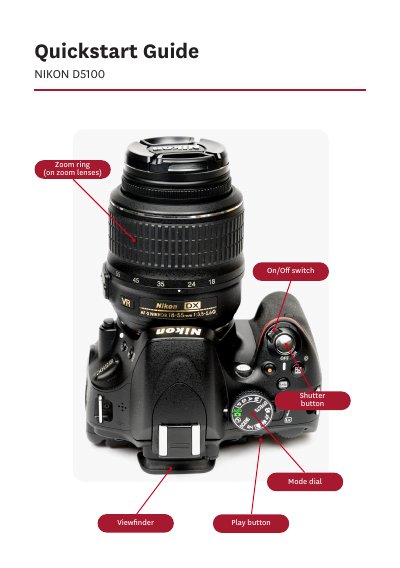
Nikon D5100 Quickstart Guide
This quickstart guide explains basic Nikon D5100 operation: remove the lens cover, turn the power on, set the mode dial to auto, hold the camera with both hands, and look through the viewfinder. It then describes zooming with the zoom ring, focusing by lightly pressing the shutter button until a beep, taking a photo with a full press, and viewing photos with the play button.
The guide also gives tips on practicing half-press and full-press shutter operation, focusing off-center by half-pressing then reframing, and stabilizing shots in low light by tucking the elbows or using a tripod. Contact information is provided for more help.
Nikon D5100 specifications
| Model | D5100 |
|---|---|
| Type | Digital single‑lens reflex camera |
| Lens Mount | Nikon F mount (with AF contacts) |
| Effective Pixels | 16.2 MP |
| Image Sensor | 23.6 × 15.6 mm CMOS |
| Storage Media | SD, SDHC, SDXC cards |
| USB Interface | High‑speed USB |
| Dimensions (W×H×D) | ≈128 × 97 × 79 mm |
| Weight (body only) | ≈510 g |
| Operating Temperature | 0 – 40 °C |
All Nikon D5100 documents by type
Day-to-day operation, settings and troubleshooting. Start here if the product is already set up.
The shortest path to a working setup, usually only a few pages.
Questions answered in these manuals
How do I focus before taking a photo?
Press the shutter button lightly; a beep indicates that the subject is in focus.
How long does it take to fully charge the D5100 battery?
Charging takes about 1 hour and 30 minutes when the battery is completely empty.
From: Nikon D5100 User Manual
What memory cards are compatible with the D5100?
The camera works with SD, SDHC, and SDXC memory cards.
From: Nikon D5100 User Manual