
This document is a simple start guide for the Nikon D7000 digital SLR camera, which explains the basic shooting methods and the installation and usage of the included software.
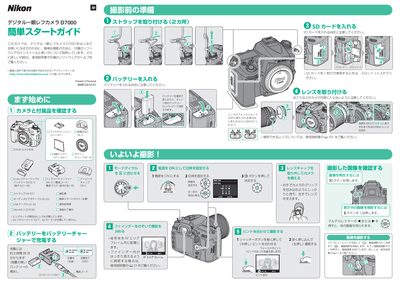
This guide introduces the Nikon D7000 digital SLR for beginners, showing how to insert the EN‑EL15 battery, select the appropriate focus mode (A or M/A), and use the SD‑card slot for storing photos and videos. It also explains basic shooting controls such as the shutter button, multi‑selector, and LCD monitor operation.
The second part walks you through installing the bundled ViewNX 2 software from the CD‑ROM, connecting the camera to a PC via USB or a card reader, and using Nikon Transfer 2 to import, edit, and print images and video clips. This manual is written in Japanese.
| Battery type | EN‑EL15 |
|---|---|
| Memory card type | SD card (single slot) |
| Focus mode options | A or M/A |
Insert the ViewNX 2 CD‑ROM into the computer’s CD‑ROM drive and follow the on‑screen prompts, clicking the Install button and accepting the default options.
Turn the camera off, connect it to the PC with the supplied USB cable (UC‑E4) or use a card reader, then run Nikon Transfer 2 to import the images.
The ViewNX 2 program includes a Movie Editor tool that lets you trim and edit video clips recorded with the camera.