
This document introduces the basic use of Nikon D100 camera
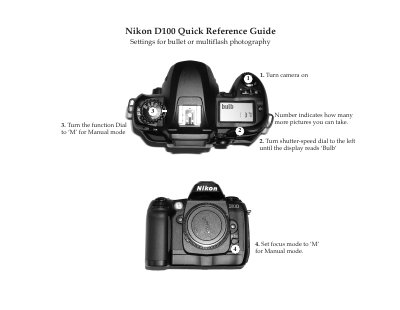
The Quick Reference Guide provides step‑by‑step instructions for turning the camera on, selecting shooting modes (Manual, Shutter‑Priority, Aperture‑Priority, point‑and‑shoot), and adjusting focus and exposure settings. It also shows how to reset the camera to its default configuration and explains the location of the battery pack, charger, and memory card slot.
Additional sections describe how to connect the D100 to a laptop via the USB port, use the Nikon Capture Control and Viewer software, and operate the camera on a tripod with an AC adapter. The guide is designed for fast setup and basic operation without detailed technical explanations.
| Shutter speed range | 30 s to 1/4000 s |
|---|---|
| Maximum image size | 3008 × 2000 pixels |
| ISO sensitivity (default) | ISO 200 |
| Battery pack location | Inside the camera body |
| Memory card type | Compact Flash |
Hold both the BKT and buttons for 2 seconds; the camera will restore default image quality, size, ISO, white balance, and focus settings.