
Key facts
- Brand
- NEC
- Model
- M311X
- Category
- Projector
- Industry
- Electronics
- Documents
- 2
- Languages
- EN
- Last added
- 2026-11-19
Start here
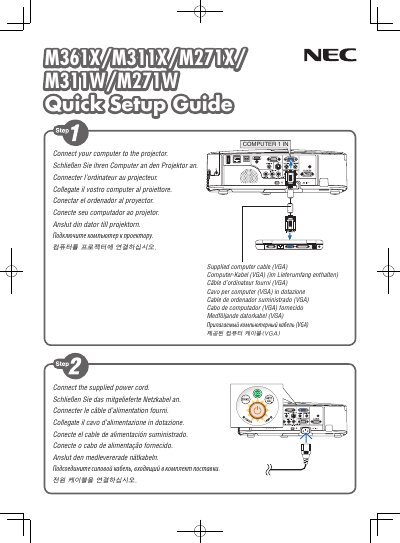
NEC M361X/M311X/M271X/M311W/M271W Projector Quick Setup Guide
This document serves as a quick setup guide for the NEC M361X/M311X/M271X/M311W/M271W projector. It outlines the essential steps for initial installation, including connecting the supplied power cord and computer cable, uncovering the lens, and selecting a video source.
Read onlineNEC M311X specifications
| Native Resolution | 1024 x 768 (XGA) |
|---|---|
| Brightness | 3100 High Bright / 2480 Normal / 1860 Eco ANSI Lumens |
| Contrast Ratio | 3000:1 |
| Lamp Life | 10000 Eco / 6000 Normal / 5000 High Bright Mode |
| Projection Distance | 0.6 – 13.8 m |
| Screen Size | Minimum: 63.5 / 25"; Maximum: 762 / 300" |
| Dimensions | 339 x 99 x 257 mm without lens and feet |
| Weight | 2.99 kg |
| Operating Temperature | 5 to 40 °C |
Source: NEC M311X Professional Desktop Projector Product Leaflet
All NEC M311X documents by type
The shortest path to a working setup, usually only a few pages.
Questions answered in these manuals
What is the native resolution of the NEC M311X?
The native resolution is 1024 x 768 (XGA).
From: NEC M311X Professional Desktop Projector Product Leaflet
How long is the lamp life in Eco mode?
The lamp lasts up to 10000 hours in Eco mode.
From: NEC M311X Professional Desktop Projector Product Leaflet
Is automatic keystone correction enabled by default?
Yes, the Automatic Keystone Correction function is turned on at the time of shipment.
From: NEC M361X/M311X/M271X/M311W/M271W Projector Quick Setup Guide
How do I manually adjust keystone correction?
You can use the ▲ or ▼ button to perform Keystone correction manually with no menu displayed.
From: NEC M361X/M311X/M271X/M311W/M271W Projector Quick Setup Guide