
NEC M361X/M311X/M271X/M311W/M271W Projector Quick Setup Guide

This document is a quick setup guide that provides instructions on how to install and connect the M361X/M311X/M271X/M311W/M271W projectors.
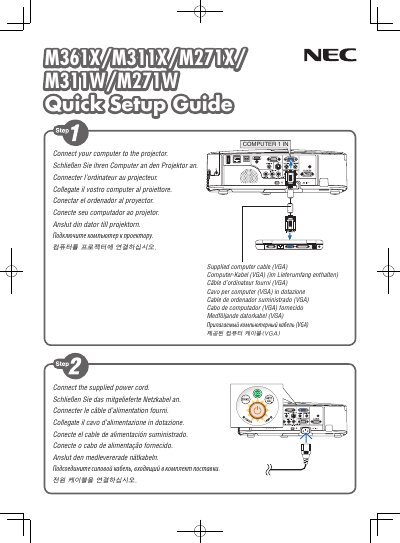

NEC M361X/M311X/M271X/M311W/M271W Projector Quick Setup Guide - cover page
Brand
NEC
Category
Projector
Document type
Quick Start Guide
Language
English
Pages
6
File format
PDF
File size
935 KB
Published
19 October, 2022
Updated
28 September, 2023
MD5 checksum
7A2B1415EC52B336D5E0AED575C5B7F4

About this manual

This document serves as a quick setup guide for the NEC M361X/M311X/M271X/M311W/M271W projector. It outlines the essential steps for initial installation, including connecting the supplied power cord and computer cable, uncovering the lens, and selecting a video source.

What's inside

  • Connect the supplied power cord
  • Connect your computer to the projector
  • Slide the lens cover to the left
  • Select a source
  • Turn on the projector
  • Automatic Keystone Correction
  • Adjust the tilt foot
  • Adjust the picture size and position
  • Power off procedure

Frequently asked questions

Is automatic keystone correction enabled by default?

Yes, the Automatic Keystone Correction function is turned on at the time of shipment.

How do I manually adjust keystone correction?

You can use the ▲ or ▼ button to perform Keystone correction manually with no menu displayed.

How do I put the projector into standby mode?

Press the POWER OFF button twice. The lamp will go off, the POWER indicator will change to orange, and the STATUS indicator will light green.

Download PDF (935 KB)

More NEC Manuals


View all NEC manuals →