
Key facts
- Manuals
- 106
- Models
- 12
- Brands
- 30+
- Languages
- ZH · EN
- Last added
- 2026-10-02
Mouse keyboard models by brand
Featured Mouse keyboard manuals
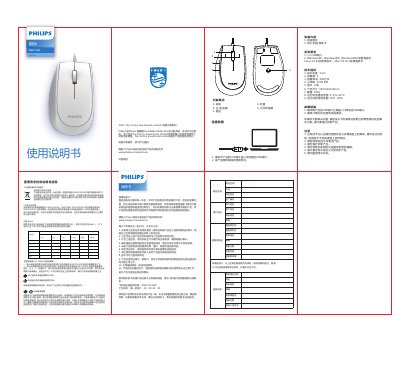
Philips SPK7327 3000 Mouse User Manual
This manual covers the Philips SPK7327 3000 wired mouse, describing its features such as a scroll wheel, left/right buttons, forward/backward buttons, and an optical sensor. It includes a warranty card, product specifications, and environmental compliance information.
Key sections include functional overview, detailed specifications (button count, resolution, dimensions, etc.), usage and connection instructions, troubleshooting tips, and regulatory declarations such as CE and RoHS compliance. This manual is written in Chinese.
Covers: Warranty Card · Function Overview · Specifications · Troubleshooting · Technical Specifications · Usage Instructions

Rapoo 3100P Wireless Optical Mouse Quick Start Guide
This Quick Start Guide provides essential information to get the Rapoo 3100P wireless optical mouse up and running quickly. It includes basic usage instructions, safety warnings, and regulatory compliance details.
The guide also outlines the two‑year limited hardware warranty, troubleshooting steps, and where to download drivers or additional support resources. It warns against opening or repairing the device and advises cleaning with a dry cloth. This manual is written in Chinese.
Covers: Safety Instructions · Warranty · Troubleshooting · Regulatory Compliance · Toxic Substances Information · Contact Information
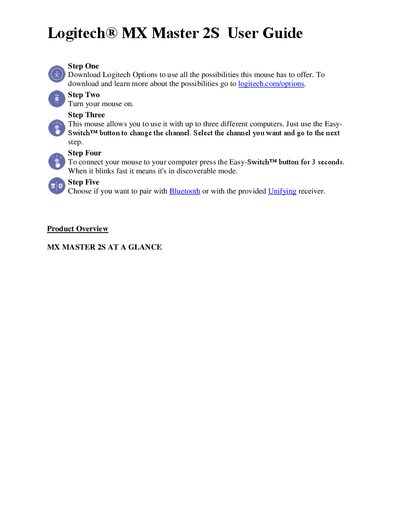
Logitech MX Master 2S Mouse User Guide
This guide walks you through downloading Logitech Options, turning the mouse on, and connecting it to up to three computers using the Easy‑Switch button. It also covers pairing via Bluetooth or the Unifying receiver.
Detailed sections describe the speed‑adaptive scroll wheel, SmartShift mode, thumb wheel, gesture button, back/forward buttons, and battery charging. Instructions for customizing button actions and checking battery status with LEDs are included.
Covers: Setup and Connection · Product Overview · SmartShift and Scroll Modes · Thumb Wheel · Gesture Button · Back/Forward Buttons

A4Tech R7-70D Wireless Optical Mouse User Manual
This manual covers the contents of the package, battery installation, and how to connect the USB receiver to a computer. It also provides operating tips such as avoiding metal surfaces, maintaining optimal distance, and using the mouse on appropriate surfaces.
Technical details include the mouse’s power specifications, LED indicators for low‑battery warnings, and the 125 Hz report rate. Safety notes and troubleshooting advice are included to help users achieve reliable performance. This manual is written in Chinese.
Covers: Package Contents · Battery Installation · Receiver Connection · Operating Tips · LED Indicators · Low‑Battery Warning
Latest Mouse keyboard manuals
Philips SPK7327 3000 Mouse User Manual
User Manual 1 pages · 7.1 MB · ZHThe Philips SPK7327 3000 mouse user manual provides specifications, usage instructions, warranty details, and safety information.
Rapoo 3100P Wireless Optical Mouse Quick Start Guide
Quick Start Guide 1 pages · 2.1 MB · ZHQuick start guide for the Rapoo 3100P wireless optical mouse, covering safety, warranty, troubleshooting and regulatory information.
Logitech MX Master 2S Mouse User Guide
User Manual 9 pages · 515 KB · ENThe Logitech MX Master 2S Mouse User Guide explains setup, features, gestures, and battery management for the wireless mouse.
Keyboard Wedge installation Manual
This document introduces the installation method of the scanner, including the connection method of keyboard wedge, RS-232 and USB interface.
Apple Wireless Keyboard Apple Wireless Mouse
Introduces how to use and install Apple wireless keyboard and mouse
APPLE Apple Wireless Keyboard USER'S MANUAL
Apple Wireless Keyboard User Guide
IBM 31P7493 Installing Keyboard Manual
ThinkPad USB Keyboard with TrackPoint User Guide
This document is the user guide for ThinkPad USB Keyboard with TrackPoint, introduces the features and characteristics of the product, as well as the installation, use methods, etc.
SONY AGC-LA series user manual
This manual is a user guide for Sony VAIO Laptop Computer VGC-L Series.
KINESIS MAXIM Adjustable Ergonomic Keyboard Optional 10-key USER S MANUAL
This user manual introduces the versions of KINESIS® MAXIM™ Adjustable Ergonomic Keyboard and Optional Numeric Keypad
KINESIS MAXIM USB Adjustable Ergonomic USB/PS2 Keyboard USER S MANUAL
User manual for KINESIS® MAXIM™ USB/PS2 Adjustable Ergonomic Keyboard. Describes the features and characteristics of the keyboard.
Logitech MX700 Manual
Instruction manual, introduces the use of MX 700 mouse
Logitech MX 5500 Revolution Manual
Logitech® Cordless Desktop® MX™ 5500 Revolution is a high-performance Bluetooth keyboard and mouse combo, with a rechargeable laser mouse that features hyper-fast scrolling for flying instantly through long documents. The keyboard has an integrated dynamic display for accessing key information and the combo uses Bluetooth® 2.0 technology to ensure a fast, reliable connection from up to 20 m (60 ft) away.
Logitech Corded Mouse M500 Manual
Logitech M500 wired mouse with 1000dpi laser precision, support back/forward buttons, can be used on Windows XP/Vista or Mac OS X 10.3.9 or later
Logitech Compact Keyboard K300 Manual
Logitech K300 is a keyboard produced by Logitech. It features stylish backlit media control buttons, space-saving design with full-size keys, integrated full-size number pad, ultra-flat profile and easy setup.
Which document do I need?
User Manual
Day-to-day operation, settings and troubleshooting. Start here if the product is already set up.
Quick Start Guide
The shortest path to a working setup, usually only a few pages.
Questions answered in Mouse keyboard manuals
What is the warranty period for the Philips SPK7327 3000 mouse?
The warranty covers one year from the purchase date for all hardware components packaged with the product.
What are the system requirements to use the mouse?
The mouse requires a USB port and works with Windows 7/8/10 or later, Linux V1.24 or later, and macOS 10.5 or later.
Where can I find warranty information for the mouse?
The device is provided with a two‑year limited hardware warranty; see www.rapoo.com/warranty for details.
How should I clean the Rapoo 3100P mouse?
Do not use the device in a damp environment; clean it with a dry cloth.
How do I switch the MX Master 2S between multiple computers?
Press the Easy‑Switch button for 3 seconds; when it blinks fast the mouse is in discoverable mode, then select the desired channel.
How can I change the scroll wheel mode?
Enable or disable SmartShift in the Logitech Options software, or assign the mode‑shift function to another button to manually switch between ratchet and freespin modes.