
Key facts
- Brand
- DELL
- Model
- Wyse 5030
- Category
- Other device
- Documents
- 2
- Languages
- EN · ZH
- Last added
- 2023-11-29
Start here
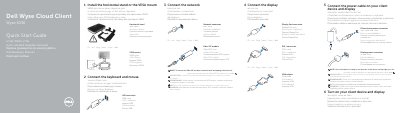
Dell Wyse Cloud Client Wyse 5030 Quick Start Guide
This quick start guide walks through setting up the Dell Wyse Cloud Client Wyse 5030 in six steps: installing the horizontal stand or VESA mount, connecting the keyboard and mouse, connecting the network (Ethernet or a Fiber SFP module), connecting a display via DisplayPort, DVI-I or a VGA adapter, attaching power to the client device and display, and turning both on. The device is ready to use when its activity light goes off.
The guide also lists the client's features, including headphone/microphone and line-out jacks, four USB 2.0 ports, DisplayPort and DVI-I video outputs, a 10/100/1000 Base-T network port or SFP/Mini-GBIC slot, a +12V DC power adapter input, a lock receptacle, and support for the horizontal stand or VESA mount. It closes with links to Dell support, manuals, contact and regulatory information. Text is provided in English, Hebrew, Hungarian, Russian, Turkish and Ukrainian.
Dell Wyse 5030 specifications
| USB ports | 4x USB 2.0 (2x + 2x) |
|---|---|
| Audio jacks | Headphone/microphone jack and Line out/Speaker out |
| Video outputs | DisplayPort connector and DVI-I port (1x DVI-D/1x VGA) |
| Network | 10/100/1000 Base-T port or SFP/Mini-GBIC slot |
| Power input | +12V DC power adapter input |
| Mounting | Horizontal stand or VESA mount |
| Security | Lock receptacle |
All Dell Wyse 5030 documents by type
The shortest path to a working setup, usually only a few pages.
Questions answered in these manuals
When is the Wyse 5030 client device ready to use?
The client device is ready to use when the client device activity light goes off.
How do I remove the Fiber SFP module from the Wyse 5030?
Rotate the latch and unplug the module from its slot.
What is the RoHS compliance status?
The device complies with Taiwan’s RoHS standard CNS15663, excluding certain components like lead, mercury, cadmium, hexavalent chromium, PBB, and PBDE.
What is the rated voltage for the Dell Wyse 5030?
The rated voltage is 100 - 240 volts (AC).