
Key facts
Start here
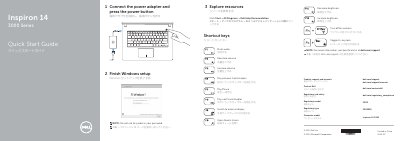
Dell Inspiron 14 3000 Series (14-3442) Laptop Quick Start Guide
This Dell quick start guide for the Inspiron 14 3000 Series and Inspiron 14-3442 laptop explains shortcut keys, initial setup steps, and support resources. It also identifies the laptop's features and ports.
The guide instructs users to connect the power adapter, press the power button, finish Windows setup, and explore Dell resources. It lists support and regulatory links and notes that the @ symbol should not be used in a Windows password.
Dell Inspiron 14-3442 specifications
| Series | Inspiron 14 3000 Series |
|---|---|
| Computer model | Inspiron 14-3442 |
| Regulatory model | P53G |
| Regulatory type | P53G001 |
Source: Dell Inspiron 14 3000 Series (14-3442) Laptop Quick Start Guide
All Dell Inspiron 14-3442 documents by type
The shortest path to a working setup, usually only a few pages.
Questions answered in these manuals
What is the computer model of this laptop?
The computer model is Inspiron 14-3442.
From: Dell Inspiron 14 3000 Series (14-3442) Laptop Quick Start Guide
How do I start the laptop?
Connect the power adapter and press the power button.
From: Dell Inspiron 14 3000 Series (14-3442) Laptop Quick Start Guide
What should I avoid when creating a Windows password?
Do not use the @ symbol in your password.
How do you start setting up the laptop?
Connect the power adapter and press the power button.