
Key facts
Start here
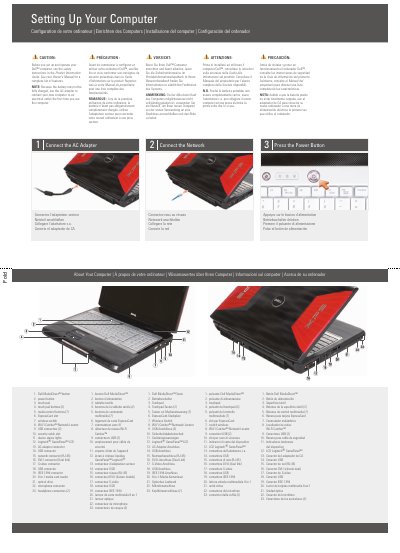
Dell XPS M1730 Computer Setup Quick Start Guide
This Dell XPS M1730 guide covers initial computer setup: connecting the AC adapter, connecting the network, and pressing the power button. It also lists the computer's buttons, slots, connectors, and status lights. The instructions appear in English, French, German, Italian, and Spanish.
A caution directs users to read the safety instructions in the Product Information Guide before setup and to see the Owner's Manual for a complete feature list. The guide notes that the battery may not be fully charged and includes a diagram for an optional wireless network plus information on finding answers at support.dell.com.
Dell m17 specifications
| Regulatory model | P37E |
|---|---|
| Regulatory type | P37E001 |
| Battery option | Medium-length battery |
| Battery option | Full-length battery |
All Dell m17 documents by type
Disassembly, diagnostics and part numbers, for repair.
The shortest path to a working setup, usually only a few pages.
Day-to-day operation, settings and troubleshooting. Start here if the product is already set up.
- Dell XPS M1730 Notebook Owner's Manual 216 p
- Dell XPS M1730 Notebook Owner's Manual 216 p
- Dell XPS M1730 Notebook Owner's Manual 208 p
- Dell Alienware M17x and M11x Laptop User Manual 118 p
- Dell Alienware M17x and M11x Laptop User Manual 118 p
- Dell Alienware M17x/M11x Mobile Laptop User Manual 118 p
- Dell XPS M1730 Notebook Owner's Manual 220 p
- Dell XPS M1730 Setup and Operation Guide 2 p
- Dell Alienware M17x Laptop User Manual 118 p
- Dell XPS M1730 Computer Setup Guide 2 p
- Dell XPS M1730 User's Manual 192 p
- Dell XPS M1710 (PP05XB) User Manual 184 p
- Dell XPS M1730 User Manual 192 p
Questions answered in these manuals
What does a continuous white light on the power and battery status indicator mean?
It indicates that the power adapter is connected and the battery has more than 5% charge.
What should I do before I start working inside the computer?
Save and close all open files, exit all open programs, and shut down the computer. Then disconnect the computer and all connected devices from their electrical outlets.
What regulatory model is the Alienware m17?
The manual identifies the regulatory model as P37E and the regulatory type as P37E001.
How do I release residual power from the computer?
Turn off the computer, disconnect the power adapter, then hold the power button for 15 seconds.
What should I read before setting up and operating the Dell computer?
See the safety instructions in the Product Information Guide and see the Owner's Manual for a complete list of features.
Should I use the AC adapter the first time I use the computer?
Yes. Because the battery may not be fully charged, use the AC adapter to connect the new computer to an electrical outlet the first time.