
Key facts
- Brand
- DELL
- Model
- 300 Series
- Category
- Other network devices
- Documents
- 8
- Languages
- EN · ZH · KO · PT
- Last added
- 2026-11-13
Start here
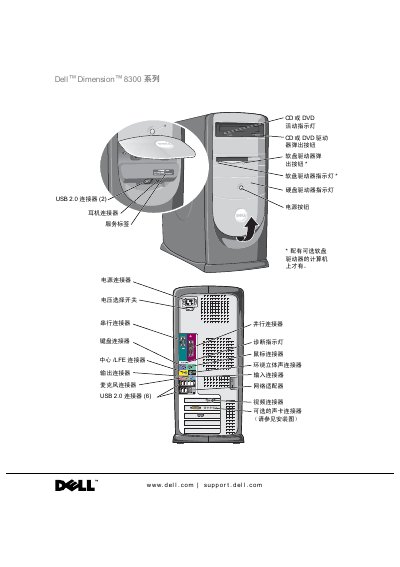
Dell Dimension 8300 Series User Manual
This document serves as the user manual for the Dell Dimension 8300 Series computer. It covers essential safety guidelines, including general principles and specific precautions for using the computer and handling internal components. The guide also explains how to set up the computer, connect peripherals, and configure the network.
The manual includes a comprehensive troubleshooting section for common issues such as battery, drive, and software problems, as well as advanced diagnostics. Additionally, it provides detailed instructions for adding or replacing hardware components like memory, hard drives, and expansion cards. This manual is written in Chinese.
Dell 300 Series specifications
| Processor | Intel Pentium 4 |
|---|---|
| Memory Type | DDR 333 or 400 (non-ECC) |
| Maximum Memory | 4 GB |
| Chipset | Intel 875P |
| Video Type | AGP 8X |
All Dell 300 Series documents by type
Disassembly, diagnostics and part numbers, for repair.
Day-to-day operation, settings and troubleshooting. Start here if the product is already set up.
Mounting, wiring and first power-up. Read it before the hardware goes in.
- Dell Networking 300 Series W-AP304/W-AP305/W-IAP304/W-IAP305 Access Point Installation Guide 5 p
- Dell Networking 300 Series Access Point Installation Guide 5 p
- Dell Networking 300 Series Access Points Installation Guide 5 p
- Dell Networking 300 Series Wireless Access Points Installation Guide 5 p
- Dell Networking 300 Series Wireless Access Points Installation Guide 5 p
Questions answered in these manuals
Who should perform the microprocessor installation?
Any installation that requires removal of the system cover is intended solely to be performed by trained service technicians.
From: Dell Microprocessor Installation Guide for Intel Xeon 5300 Series
What happens if the BIOS and BMC firmware are not updated before installation?
Failure to update the system to the latest BIOS and BMC firmware versions prior to installing the microprocessor can result in the system hanging during POST.
From: Dell Microprocessor Installation Guide for Intel Xeon 5300 Series
What safety precautions should be taken before opening the computer case?
You must turn off the computer and all connected devices, and unplug the power cord before removing the cover to avoid electric shock or damage to the system board.
How long should you wait after turning off the computer before disconnecting devices?
You should wait 5 seconds after turning off the computer before disconnecting devices to avoid damaging the system board.
What software do the W-AP304 and W-AP305 access points require?
They require AOS 6.5.1 or later.
From: Dell Networking 300 Series W-AP304/W-AP305/W-IAP304/W-IAP305 Access Point Installation Guide
What software do the W-IAP304 and W-IAP305 access points require?
They require Instant 4.3.1 or later.
From: Dell Networking 300 Series W-AP304/W-AP305/W-IAP304/W-IAP305 Access Point Installation Guide