
Key facts
- Brand
- DELL
- Model
- Inspiron One 2330 Series
- Category
- All-in-One Desktops
- Documents
- 2
- Languages
- EN · ZH
- Last added
- 2023-11-26
Start here
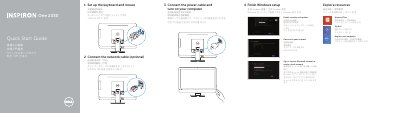
Dell Inspiron One 2330 Series Computer Quick Start Guide
This Dell quick start guide for the Inspiron One 2330 series computer gives initial setup steps: set up the keyboard and mouse, connect the network cable if needed, connect the power cable, turn on the computer, finish Windows setup, enable security and updates, sign in to a Microsoft account or create a local account, connect to the network, explore resources, and register the computer.
Page 2 provides links for product support and manuals, contacting Dell, and regulatory and safety information, and lists regulatory model W05C and type W05C001. It also gives a numbered feature list for the computer, including microphones, camera, optical drive, brightness-control buttons, input-source selection/display-off button, power button, media-card reader, USB 3.0 and USB 2.0 ports, microphone, headphone, S/P DIF, VGA-in, VGA-out, audio-out, network, power, HDMI-in, composite ports, and a security-cable slot.
Dell Inspiron One 2330 Series specifications
| Computer model | Inspiron One 2330 series |
|---|---|
| USB 3.0 ports | Two at item 10 and two at item 17 |
| USB 2.0 ports | Two |
| Brightness-control buttons | Two |
| HDMI-in port | Optional |
| VGA-in port | Optional |
| Input-source selection | Optional |
Source: Dell Inspiron One 2330 Series Computer Quick Start Guide
All Dell Inspiron One 2330 Series documents by type
The shortest path to a working setup, usually only a few pages.
Questions answered in these manuals
How do I set up the keyboard and mouse?
The guide lists setting up the keyboard and mouse as the first setup step.
From: Dell Inspiron One 2330 Series Computer Quick Start Guide
How do I turn on the computer?
Connect the power cable and turn on your computer.
From: Dell Inspiron One 2330 Series Computer Quick Start Guide
How do I connect the computer to a network?
You can connect the network cable during setup (optional) and then connect to your network when finishing Windows setup.
From: Dell Inspiron One 2330 Series Computer Quick Start Guide
How do I start the computer for the first time?
Connect the power cable, turn on the computer, and then finish Windows setup.
From: Dell Inspiron One 2330 Series Computer Quick Start Guide