
Key facts
Start here
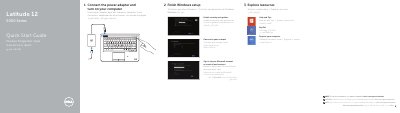
Dell Latitude 12 5000 Series Quick Start Guide
This document serves as a Quick Start Guide for the Dell Latitude 12 5000 Series laptop. It provides multilingual instructions for the initial setup process, including connecting the power adapter, finishing Windows setup, enabling security updates, connecting to a network, and signing into a Microsoft account. Users are directed to the Owner's Manual on dell.com/support/manuals for further information.
Read onlineDell Latitude 12 5000 Series specifications
| Regulatory model | T17G |
|---|---|
| Regulatory type | T17G001 |
| Computer model | Latitude 5285 2-in-1 |
| Battery | FWRM8 (7.4Vdc, 30Wh) |
| Charger | PA-1300-04 |
Source: Dell Latitude 12 5000 Series 2-in-1 Quick Start Guide
All Dell Latitude 12 5000 Series documents by type
The shortest path to a working setup, usually only a few pages.
- Dell Latitude 12 5000 Series Quick Start Guide 2 p
- Dell Latitude 12 5000 Series 2-in-1 Quick Start Guide 2 p
- Dell Latitude 12 5000 Series 2-in-1 Quick Start Guide 2 p
- Dell Latitude 12 5000 Series 2-in-1 Quick Start Guide 2 p
- Dell Latitude 12 5000 Series 2-in-1 Quick Start Guide 2 p
- Dell Latitude 12 5000 Series 2-in-1 Quick Start Guide 2 p
- Dell Latitude 12 5000 Series Notebook Quick Start Guide 2 p
Day-to-day operation, settings and troubleshooting. Start here if the product is already set up.
Questions answered in these manuals
How do I turn on the computer?
Connect the power adapter and turn on the computer.
What is the computer model?
Latitude 5285 2-in-1.
Which optional cards can be inserted?
Optional micro-SIM and microSD memory cards, sold separately.
What is the regulatory model for this computer?
The regulatory model is T17G.
What is the regulatory type for this computer?
The regulatory type is T17G001.
Where is the microSD card slot located?
It is located under the kickstand.