
Key facts
- Brand
- Olympus
- Model
- FE-210
- Category
- Digital cameras
- Industry
- Electronics
- Documents
- 3
- Languages
- EN
- Last added
- 2012-06-08
Start here
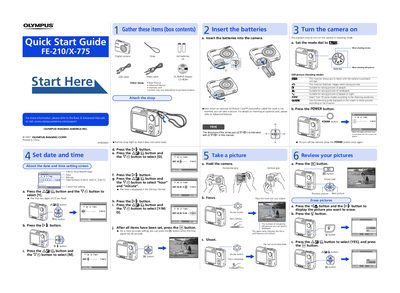
Olympus FE-210/X-775 Quick Start Guide
This document serves as a Quick Start Guide for the Olympus FE-210/X-775 digital camera. It provides initial instructions on gathering box contents, attaching the strap, setting the date and time, and inserting batteries.
The guide details how to turn on the camera in shooting mode using the mode dial and power button. It explains various still picture shooting modes, including Scene Select and Guide Mode, and covers basic operations such as taking pictures, reviewing images, and erasing photos.
All Olympus FE-210 documents by type
Day-to-day operation, settings and troubleshooting. Start here if the product is already set up.
The shortest path to a working setup, usually only a few pages.
Questions answered in these manuals
What is the purpose of the mode dial setting 'A'?
The function allows you to shoot with the camera's automatic settings.
How do you turn off the camera?
To turn off the camera, press the POWER button once again.
What is the recommended way to set the date and time for accuracy?
For a more accurate setting, you can press the button when the time signal hits 00 seconds.
Can I take pictures without an xD-Picture Card inserted?
Yes, even when an optional xD-Picture Card is not inserted, you can take a picture.