
This document introduces the use of the Olympus FE-210/X-775 camera, including how to install batteries, insert an SD card, use the camera's auto shooting mode, take static pictures and videos
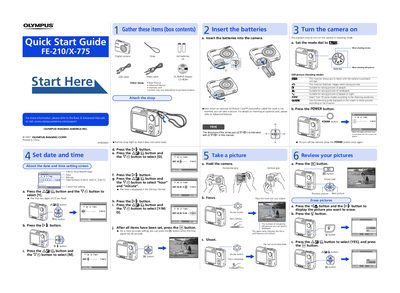
This document serves as a Quick Start Guide for the Olympus FE-210/X-775 digital camera. It provides initial instructions on gathering box contents, attaching the strap, setting the date and time, and inserting batteries.
The guide details how to turn on the camera in shooting mode using the mode dial and power button. It explains various still picture shooting modes, including Scene Select and Guide Mode, and covers basic operations such as taking pictures, reviewing images, and erasing photos.
For a more accurate setting, you can press the button when the time signal hits 00 seconds.
Yes, even when an optional xD-Picture Card is not inserted, you can take a picture.
Press the button and the button to display the picture you want to erase, then press the button.