
Key facts
- Brand
- Konica Minolta
- Model
- PagePro 1390 MF
- Category
- Printer
- Industry
- Computers
- Documents
- 3
- Languages
- ZH · EN
- Last added
- 2012-03-16
Start here
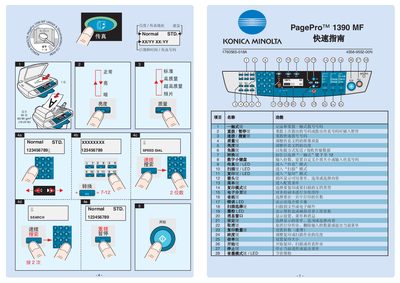
Konica Minolta PagePro 1390 MF Quick Start Guide
This quick start guide introduces the basic operation of the Konica Minolta PagePro 1390 MF. It covers menu navigation, brightness adjustment, speed‑dial functions and the meaning of the LED indicators.
The manual also explains how to cancel a print job, set paper size and weight, and use the built‑in magnification and depth settings for optimal output. This manual is written in Chinese.
Konica Minolta PagePro 1390 MF specifications
| Power supply voltage | 230 V |
|---|---|
| Power supply voltage (alternative) | 110 V |
| Width | 492 mm |
All Konica Minolta PagePro 1390 MF documents by type
The shortest path to a working setup, usually only a few pages.
Mounting, wiring and first power-up. Read it before the hardware goes in.
Day-to-day operation, settings and troubleshooting. Start here if the product is already set up.
Questions answered in these manuals
How do I cancel a print job?
Press the Cancel key to stop the current print job.
What does the LED indicator mean?
The LED shows the toner level; when it indicates low, replace the toner cartridge.
What should be done before setting up the printer?
Examine the safety information in the General Information Guide before installing the printer.
What should you do with the packing material after unpacking?
Keep all packing materials in case you need to move or ship the printer later.
What operating environment is the PagePro 1390 MF designed for?
The machine is designed to achieve optimal performance in a Windows environment.
Which telephone line types can be connected to this machine?
You can connect either a PSTN line or a PBX line to the machine.