
PagePro™ 1390 MF is a multifunction printer with LED printing technology. It supports both black and white and color printing, with high-speed printing and copying capabilities. It is suitable for office environments. The printer supports various types and sizes of paper, and has a user-friendly interface and quick dialing function.
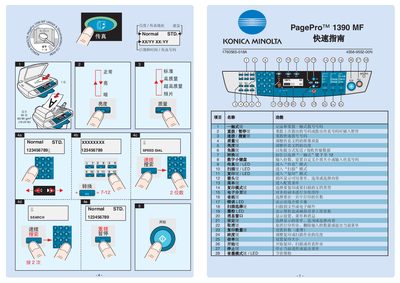
This quick start guide introduces the basic operation of the Konica Minolta PagePro 1390 MF. It covers menu navigation, brightness adjustment, speed‑dial functions and the meaning of the LED indicators.
The manual also explains how to cancel a print job, set paper size and weight, and use the built‑in magnification and depth settings for optimal output. This manual is written in Chinese.
| Supported paper sizes | Letter, Legal, A4 |
|---|---|
| Paper weight range | 60‑90 g/m² |
Press the Cancel key to stop the current print job.
The LED shows the toner level; when it indicates low, replace the toner cartridge.