
Key facts
- Manuals
- 123
- Models
- 29
- Categories
- 5
- Languages
- ZH · EN
- Last added
- 2026-10-01
Konica Minolta models by category
Featured Konica Minolta manuals
Konica Minolta magicolor 4750EN/4750DN User Manual
This manual introduces the Konica Minolta magicolor 4750EN/4750DN printer, describing its physical layout, required space, and key components such as the control panel, paper trays, and optional accessories. It also provides detailed instructions for installing and configuring the printer drivers on Windows, Macintosh and Linux systems.
The guide covers paper handling, including supported paper sizes, types, and special media, as well as duplex printing limits and label printing tips. Additional sections explain the use of the status monitor, memory direct printing, and troubleshooting common issues like paper jams and error messages. This manual is written in Chinese.
Covers: Introduction · Familiarize with the printer · Space requirements · Printer components and front/rear view · Paper handling and supported media · Driver installation and software options
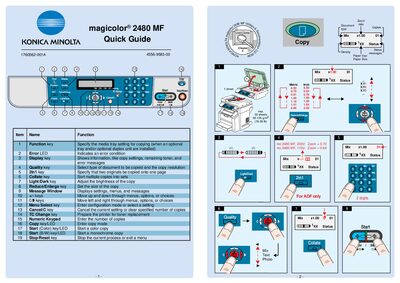
Konica Minolta magicolor 2480 MF Quick Guide
This Quick Guide provides concise instructions for operating the Konica Minolta magicolor 2480 MF multifunction printer. It explains the purpose of each function key, error LED, and display key, as well as how to adjust copy settings such as quality, collate, and zoom.
The guide also details the steps for replacing consumables, including toner and drum cartridges, and includes notes on scanning and paper handling. It is intended for users who need fast reference information without a full manual.
Covers: Function Keys · Error LEDs · Display Keys · Copy Settings · Replacing Consumables · Toner Cartridge
Konica Minolta magicolor 5440 DL Printer General Information Guide
This General Information Guide offers essential support information for the Konica Minolta magicolor 5440 DL printer, including how to obtain technical assistance and what data to prepare before contacting support. It also lists the printer model and serial‑number requirements for service requests.
The guide contains contact details for Konica Minolta service centers across North America, Europe, the Middle East, Africa, Asia Pacific, China, and Japan, with telephone, fax, email, and website information for each region.
Covers: Worldwide Konica Minolta Contacts · North and South America Information Service & Support · Europe, Middle East and Africa Information Service & Support · Asia Pacific Information Service & Support · China Information Service & Support · Japan Information Service & Support
Latest Konica Minolta manuals
Konica Minolta magicolor 4750EN/4750DN User Manual
User Manual 247 pages · 5.3 MB · ZHUser manual for the Konica Minolta magicolor 4750EN/4750DN printer covering setup, driver installation, paper handling and maintenance.
Konica Minolta magicolor 2480 MF Quick Guide
Quick Start Guide 3 pages · 676 KB · ENQuick guide for the Konica Minolta magicolor 2480 MF printer, covering function keys, error LEDs, display keys, copy settings, and consumable replacement.
Konica Minolta magicolor 5440 DL Printer General Information Guide
Product Leaflet 56 pages · 1.8 MB · ENThe General Information Guide for the Konica Minolta magicolor 5440 DL printer provides worldwide support contacts, technical details, and assistance resources.
KONICA MINOLTA bizhub163/211 easy Manual
KONICA MINOLTA bizhub Pro920 easy Manual
KONICA MINOLTA bizhub C252 easy Manual
This document is a user manual for the bizhub C252 copier. It introduces the basic operating methods of the copier, including color setting, paper size setting, zoom setting, offset and sorting setting, single-sided printing and double-sided printing, and original combination setting.
KONICA MINOLTA bizhub C250 easy Manual
This document is the Chinese user manual of bizhub C250 copier
KONICA MINOLTA bizhub 600/750 easy Manual
This document is the bizhub 600/750 Chinese user manual, which introduces the product's usage methods, including basic functions, zoom, offset, original combination, and page editing functions.
KONICA MINOLTA bizhub 250/350 easy Manual
This is a user manual for bizhub 250/350 copier, which introduces how to use the copier's various functions, such as paper selection, zoom ratio, sorting, single-sided or double-sided copying, original combination, and density.
KONICA MINOLTA bizhub 552/652 Simple User Manual
This document is a shortcut manual for bizhub 552/652 multi-function printers. It introduces the various parts of the control panel, as well as the steps for account login and user authentication. It also explains the density and background adjustment functions in the copy function.
KONICA MINOLTA bizhub C452/C552/C652 Simple User Manual
This document is a shortcut manual for the bizhub C452/C552/C652 multifunction printer. It provides an overview of the printer's components and functions, as well as instructions for basic operations such as color and black and white copying.
KONICA MINOLTA bizhub C35 Simple User Manual
This document is a shortcut manual for bizhub C35 2, providing an overview of the control panel and instructions on how to use the copy function, including color settings and paper size/type settings.
KONICA MINOLTA α-5 DIGITAL Manual
This manual explains how to use the Konica Minolta a-5 DIGITAL digital camera, including how to attach a lens, battery, storage card, set the date and time, take photos, play back photos, and delete photos.
KONICA MINOLTA DiMAGE Z6 Manual
This is a user manual for Konica Minolta DiMAGE Z6 digital camera, which introduces the camera's features and functions, including package list, batteries, power, pre-use precautions, etc.
KONICA MINOLTA DiMAGE X1 Manual
This is a user manual for Konica Minolta DiMAGE X1 digital camera, introducing the features and usage of the camera
Which document do I need?
User Manual
Day-to-day operation, settings and troubleshooting. Start here if the product is already set up.
Quick Start Guide
The shortest path to a working setup, usually only a few pages.
Questions answered in Konica Minolta manuals
What is the maximum paper width the printer can handle?
The maximum paper width is 216.0 mm (8.5 inches).
Can the printer print on envelope DL size paper?
Yes, envelope DL (8.7 × 4.3 inches) can be loaded even though the maximum width is 216 mm.
What does the error LED indicate?
The error LED indicates an error condition.
How do I start a color copy?
Press the Start (Color) key/LED to begin a color copy.
What information should I have ready when contacting technical support?
You should have the printer model and serial number, your contact details, a description of the problem, computer type, operating system version, interface and protocol, application and version, emulation type, and a configuration or status page.
From: Konica Minolta magicolor 5440 DL Printer General Information Guide
Which regions are covered by the worldwide support contacts?
Support contacts are provided for North and South America, Europe, the Middle East and Africa, Asia Pacific, China, and Japan.
From: Konica Minolta magicolor 5440 DL Printer General Information Guide