
Key facts
- Brand
- Konica Minolta
- Model
- 2480MF
- Documents
- 2
- Languages
- ZH · JA
- Last added
- 2012-03-16
Start here
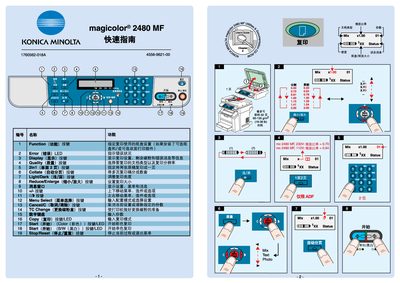
Konica Minolta magicolor 2480MF Quick Start Guide
This quick guide introduces the main functions of the Konica Minolta magicolor 2480MF printer, including menu selections for copy, start/stop, color and B/W modes, collate, and image enlargement. It explains the display indicators such as the Error LED and quality settings to help users monitor printer status.
The manual also provides instructions for replacing consumables like toner drums and outlines how to install the TWAIN driver for scanning applications. Safety cautions and end‑of‑life information are included to ensure proper maintenance. This manual is written in Japanese.
Konica Minolta 2480MF specifications
| Print speed (colour / B&W) | 5 ppm colour, 20 ppm B&W |
|---|---|
| Maximum print resolution | 2400 x 600 dpi |
| ADF capacity | 10 pages |
Source: Konica Minolta magicolor 2590MF/2490MF/2480MF User Manual
All Konica Minolta 2480MF documents by type
Day-to-day operation, settings and troubleshooting. Start here if the product is already set up.
The shortest path to a working setup, usually only a few pages.
Questions answered in these manuals
What is the printing speed of the magicolor 2590MF?
It prints colour at 5 pages per minute and black‑and‑white at 20 pages per minute.
From: Konica Minolta magicolor 2590MF/2490MF/2480MF User Manual
What is the maximum print resolution?
The device can print up to 2400 × 600 dpi.
From: Konica Minolta magicolor 2590MF/2490MF/2480MF User Manual
What does the Error LED indicate?
The Error LED lights up to signal a problem, and the display will show the specific error condition.