
Key facts
- Brand
- DELL
- Model
- C521
- Documents
- 3
- Languages
- ZH
- Last added
- 2026-10-06
Start here
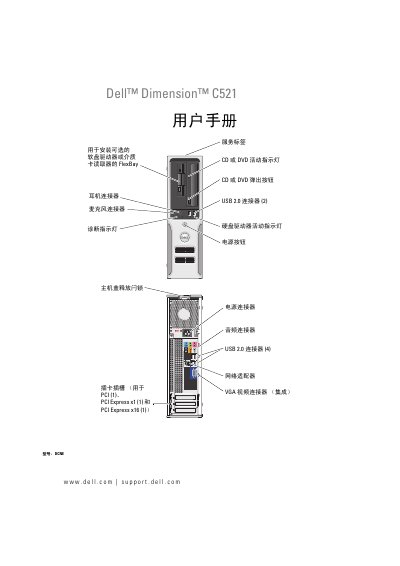
Dell Dimension C521 User Manual
This manual covers the complete setup of the Dell Dimension C521 desktop, including hardware installation, operating system configuration, network connection, and peripheral setup. Detailed sections guide users through installing optional drives, configuring power options, and using the built‑in diagnostics.
The document also includes a comprehensive troubleshooting guide, specifications of the system components, safety and regulatory information, and an index for quick reference to common issues and procedures. This manual is written in Chinese.
DELL C521 specifications
| Processor | AMD Athlon 64 X2 Dual‑Core |
|---|---|
| Memory Type | DDR2 SDRAM |
| Supported Memory Modules | 256 MB, 512 MB, 1 GB (non‑ECC) |
| Maximum Memory | 4 GB |
| Power Supply | 280 W |
| Dimensions (H×W×D) | 11.4 cm × 39.9 cm × 35.3 cm |
| Weight | 10.4 kg |
| Operating Temperature | 10 °C to 35 °C |
Source: Dell Dimension C521 User Manual
All DELL C521 documents by type
Day-to-day operation, settings and troubleshooting. Start here if the product is already set up.
Questions answered in these manuals
What is the maximum memory supported by the Dell Dimension C521?
The system supports up to 4 GB of memory.
How do I replace the battery?
The manual includes a "Replace battery" section on page 86 that explains the procedure.
What do the diagnostic indicator lights mean?
The meaning of the diagnostic indicator lights is described in the "Diagnostic indicator lights" section on page 45‑46.