
This manual provides safety instructions, setup, usage, troubleshooting, and hardware upgrade information for the Dell Dimension 8300 Series computer.
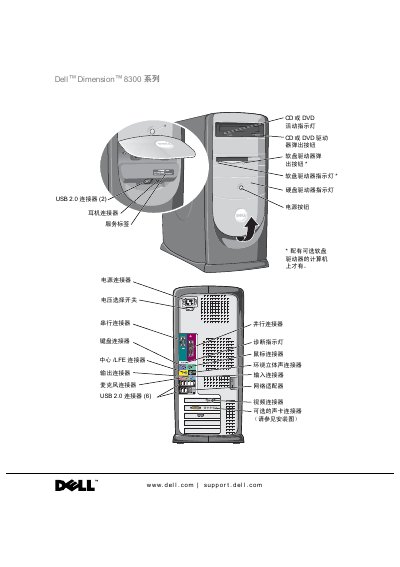
This document serves as the user manual for the Dell Dimension 8300 Series computer. It covers essential safety guidelines, including general principles and specific precautions for using the computer and handling internal components. The guide also explains how to set up the computer, connect peripherals, and configure the network.
The manual includes a comprehensive troubleshooting section for common issues such as battery, drive, and software problems, as well as advanced diagnostics. Additionally, it provides detailed instructions for adding or replacing hardware components like memory, hard drives, and expansion cards. This manual is written in Chinese.
| Processor | Intel Pentium 4 |
|---|---|
| Memory Type | DDR 333 or 400 (non-ECC) |
| Maximum Memory | 4 GB |
| Chipset | Intel 875P |
| Video Type | AGP 8X |
You must turn off the computer and all connected devices, and unplug the power cord before removing the cover to avoid electric shock or damage to the system board.
You should wait 5 seconds after turning off the computer before disconnecting devices to avoid damaging the system board.
The minimum memory required is 256 MB.