
Key facts
Start here
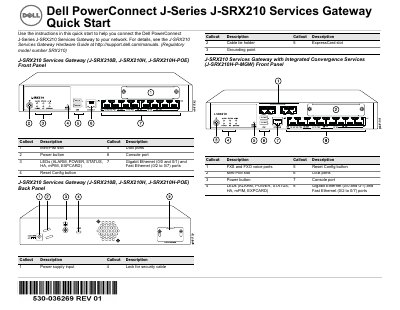
Dell J-SRX210 Services Gateway Quick Start Guide
This Quick Start Guide provides instructions for connecting the Dell PowerConnect J-Series J-SRX210 Services Gateway to a network. It covers physical setup steps including grounding, power connection, and connecting a management device via Ethernet or console port. The guide details how to verify LED status and wait for the device to boot.
Read onlineDell 210S specifications
| Wireless Standards | IEEE 802.11ac and 802.11n |
|---|---|
| Technology | MIMO |
| Power over Ethernet | 802.3at PoE+ and 802.3af PoE |
| DC Power Input | 12 VDC (+/- 5%)/18W |
| Ethernet Port | 10/100/1000Base-T |
| Controller Requirement | Dell Networking W-Series Mobility Controller |
| Software Version | ArubaOS 6.4.2.0 or later |
Source: Dell W-AP210 Series Wireless Access Point Installation Guide
All Dell 210S documents by type
Mounting, wiring and first power-up. Read it before the hardware goes in.
- Dell W-AP210 Series Wireless Access Point Installation Guide 2 p
- Dell EqualLogic PS Series PS6210 Storage Array Installation Guide 2 p
- Dell EqualLogic PS4210 Storage Matrix Installation and Configuration Guide 48 p
- Dell EqualLogic PS6210 Storage Array Installation and Setup Guide 43 p
- Dell EqualLogic PS6210 Storage Array Installation and Configuration Guide 50 p
- Dell EqualLogic PS4210 Storage Array Installation Guide 41 p
- Dell EqualLogic PS6210 Storage Array Installation and Setup Guide 42 p
- Dell PowerEdge R210 Systems Getting Started With Your System 109 p
Disassembly, diagnostics and part numbers, for repair.
- Dell PowerVault 200S, 201S, 210S, and 211S Storage Systems Installation and Service Guide 148 p
- Dell PowerVault 200S, 201S, 210S and 211S Storage System Installation and Service Guide 144 p
- Dell EqualLogic PS6210 Storage Array Hardware Owner's Manual 52 p
- Dell Inspiron 1210 Service Manual 39 p
- Dell XPS 210 Service Manual 51 p
- Dell XPS 210 Service Manual 51 p
Day-to-day operation, settings and troubleshooting. Start here if the product is already set up.
- Dell EqualLogic PS4210 Storage Array Hardware Owner's Manual 52 p
- Dell EqualLogic PS6210 Storage Array Hardware User's Guide 48 p
- Dell ST2210/ST2310/ST2410 Flat Panel Monitor User's Guide 33 p
- Dell P2210 SFF AIO Flat Panel Monitor User's Guide 41 p
- Dell P2210 SFF AIO Flat Panel Monitor User's Guide 46 p
- Dell P2210 SFF AIO Flat Panel Monitor User's Guide 45 p
- Dell P2210 SFF AIO Flat Panel Monitor User's Guide 39 p
- Dell PowerEdge R210 System Hardware User's Guide 59 p
- Dell P2210 Series Flat Panel Monitor User's Guide 37 p
- Dell PowerEdge R210 Systems Hardware Owner's Manual 60 p
- Dell EqualLogic PS6210 Storage Arrays Hardware Owner's Manual 48 p
- Dell PowerEdge R210 Systems Hardware Owner's Manual 61 p
- Dell 1210S Projector User's Guide 59 p
- Dell PowerEdge VRTX R1-2401 and R1-2210 Switch Modules User Guide 528 p
- Dell ST2210/ST2310/ST2410 Flat Panel Monitor User's Guide 33 p
- Dell 1210S Projector User's Guide 59 p
- Dell 1210S Projector User Manual 56 p
The shortest path to a working setup, usually only a few pages.
Questions answered in these manuals
What are the included accessories in the package?
The package includes the W-AP214 or W-AP215 Access Point, 9/16" and 15/16" Ceiling Rail Adapters, and the Installation Guide.
From: Dell W-AP210 Series Wireless Access Point Installation Guide
Which power sources are supported for the W-AP210 Series?
The device supports IEEE 802.3at or 802.3af-compliant Power over Ethernet (PoE) sources or an optional Dell AP AC-DC adapter kit.
From: Dell W-AP210 Series Wireless Access Point Installation Guide
Which Dell PowerVault storage systems does this guide cover?
Dell PowerVault 200S, 201S, 210S, and 211S storage systems.
From: Dell PowerVault 200S, 201S, 210S, and 211S Storage Systems Installation and Service Guide
What module can be configured for cluster operation?
An ESEM or SEMM module.
From: Dell PowerVault 200S, 201S, 210S, and 211S Storage Systems Installation and Service Guide
Which PowerVault models does this guide cover?
It covers the PowerVault 200S, 201S, 210S, and 211S storage systems.
From: Dell PowerVault 200S, 201S, 210S and 211S Storage System Installation and Service Guide
What software is needed to read the PDF manual?
Adobe Acrobat Reader 4.0 is required.
From: Dell PowerVault 200S, 201S, 210S and 211S Storage System Installation and Service Guide