
Key facts
Start here
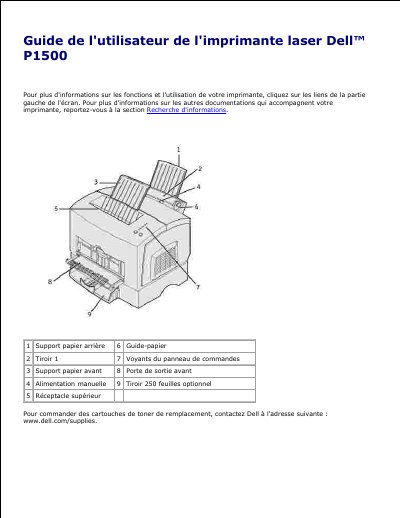
Dell P1500 Laser Printer User's Guide
This is the French user guide for the Dell P1500 laser printer. It describes the printer's parts, including the paper trays, manual feed, output bin, control panel lights and buttons, and explains how to load paper and select a suitable interface cable.
The document also covers software installation, toner ordering, printing the printer configuration sheet, safety notices, warranty and service information, FCC regulatory compliance, and ENERGY STAR qualification. This manual is written in French.
Dell P1500 specifications
| Paper capacity (Tray 1) | Up to 150 sheets of paper |
|---|---|
| Optional paper tray | 250-sheet optional tray |
| Control panel | Six indicators and two buttons |
| Laser class | Class I |
| Laser output | 5 milliwatts gallium arsenide laser |
| Interface cables | USB 2.0 and IEEE-1284 parallel |
| FCC classification | Class B digital device |
All Dell P1500 documents by type
Day-to-day operation, settings and troubleshooting. Start here if the product is already set up.
Questions answered in these manuals
How do I load special materials like labels or cardstock?
Use the manual feed slot to load a single sheet of paper or other materials such as transparencies, labels, envelopes, and cardstock.
How many sheets of paper can Tray 1 hold?
Tray 1 can be loaded with up to 150 sheets of paper or 10 sheets of other material.
Which toner cartridges does Dell recommend?
Dell recommends using Dell toner cartridges and provides no warranty for print quality or reliability with other brands.
How many buttons are on the printer control panel?
The control panel has six indicators and two buttons, including Continue and Cancel.
How many sheets of paper can Tray 1 hold?
Tray 1 can hold up to 150 sheets of paper or 10 sheets of other media.
Where can I order toner cartridges for this printer?
Toner cartridges can be ordered online at www.dell.com/supplies or by phone.