
Key facts
- Brand
- DELL
- Model
- Wyse 1010
- Category
- Other Computer Accessories
- Documents
- 9
- Languages
- EN
- Last added
- 2023-11-25
Start here
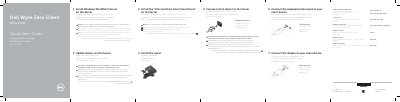
Dell Wyse 1010 Zero Client Quick Start Guide
This quick start guide for the Dell Wyse 1010 zero client presents ten setup steps: install Windows MultiPoint Server on the server, update server drivers, install the 10xx (and Exx) Zero Client Driver, install the stand, connect the client device to the server, connect the keyboard and mouse, connect the display, connect the power cable, turn on the client device and display, and configure the client device on Windows MultiPoint Server.
The guide also lists client device features: +5V DC power adapter input, security-cable slot, reset button, 10/100/1000 Base-T network port, VGA port, power on/off switch, microphone in jack, audio out jack and four USB 2.0 ports. It includes VESA mounting information and links for product support, manuals, contacting Dell and regulatory compliance; the document is dated 2016-04 and printed in Taiwan.
Dell Wyse 1010 specifications
| Power adapter input | +5V DC |
|---|---|
| Network port | 10/100/1000 Base-T |
| VGA port | VGA |
| USB 2.0 ports | 4x USB 2.0 |
| Microphone input | Microphone in jack |
| Audio output | Audio out jack |
| Security-cable slot | Present |
| Power switch | Power on/off |
All Dell Wyse 1010 documents by type
The shortest path to a working setup, usually only a few pages.
- Dell Wyse 1010 Zero Client Quick Start Guide 2 p
- Dell Wyse 1010 Zero Client Quick Start Guide 2 p
- Dell Wyse 1010 Zero Client Quick Start Guide 2 p
- Dell Wyse 1010 Zero Client Quick Start Guide 2 p
- Dell Wyse 1010 Zero Client Quick Start Guide 2 p
- Dell Wyse 1010 Zero Client Quick Start Guide 2 p
- Dell Wyse 1010 Zero Client Quick Start Guide 2 p
- Dell Wyse 1010 Zero Client Quick Start Guide 2 p
Day-to-day operation, settings and troubleshooting. Start here if the product is already set up.
Questions answered in these manuals
What power adapter input does the Wyse 1010 client device have?
The client device has a +5V DC power adapter input.
How many USB 2.0 ports are on the client device?
The client device has four USB 2.0 ports.
How do I know when the Wyse 1010 client device is ready to use?
The client device is ready to use when its activity light goes off.
Where can the 10xx (and Exx) Zero Client Driver be downloaded?
Driver software can be found at www.dell.com/wyse/downloads.
Where can I find the driver software for the Wyse 1010?
Driver software is available at www.dell.com/wyse/downloads.
How do I know when the client device is ready to use?
The device is ready for use once the activity light goes off.