
Philips mobile phone user manual, introduces the basic functions and usage methods of the phone, including how to make calls, receive and send text messages, input text, manage phonebooks, etc.
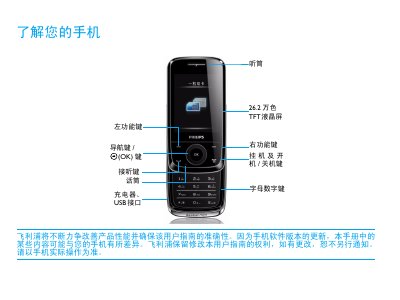
This manual guides users through the first‑time setup of the Philips Xenium X510, including SIM card insertion, battery charging, and Micro‑SD card installation. It also explains how to synchronize the phone with a computer and customize settings such as clock, shortcuts and scenario modes.
The document covers basic functions like making calls, sending messages, using multimedia apps, and managing contacts. Safety warnings, SAR limits, battery‑care tips, and a detailed troubleshooting section help ensure reliable and safe operation of the device. This manual is written in Chinese.
| Screen | 26.2万色 TFT液晶屏 |
|---|---|
| Network | GSM 900/1800 MHz |
| SAR limit | 0.354 W/kg |
Yes, the phone can be used while charging, but keep the charger connected after the battery is fully charged to avoid damage.
Remove the battery, reinstall it, then charge the battery until the indicator stops flashing before trying to power on the phone again.