
Philips mobile phone user manual, introduces the functions of each key of the mobile phone, standby screen, icons and symbols, how to install SIM card and charge the mobile phone for the first time, how to make a call, answer the call and hang up, how to use speed dial
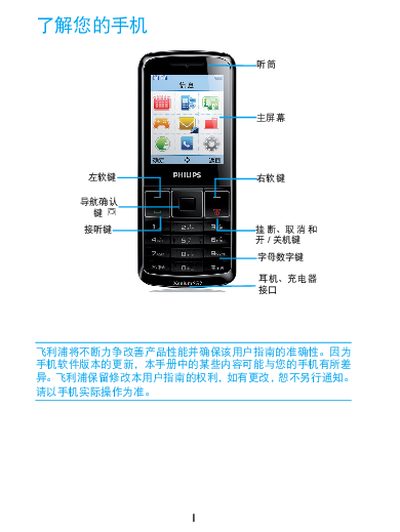
This manual explains how to install the SIM card, charge the battery, and use the basic functions of the Philips Xenium X128 phone. It describes the layout of the standby screen, the meaning of icons, and the steps for making calls, sending messages, and using the various input methods.
Additional sections provide troubleshooting tips for common issues such as battery problems, network errors, and device overheating, as well as safety and regulatory information about SAR limits and RoHS compliance. This manual is written in Chinese.
| SAR (Specific Absorption Rate) | 0.665 W/kg |
|---|
Remove the battery cover, insert the SIM card into slot 2, then reinstall the battery.
Enter the phone number, press the call key to dial, and press the hang‑up key to end the call.
Yes, you can continue to use the phone while it is charging.
Remove the battery, reinstall it, then charge the battery until the charging icon stops flashing before trying to power on again.