
Philips mobile phone product user guide, introducing the phone's key operations, icon and symbol explanations, personalized settings, basic functions, etc.
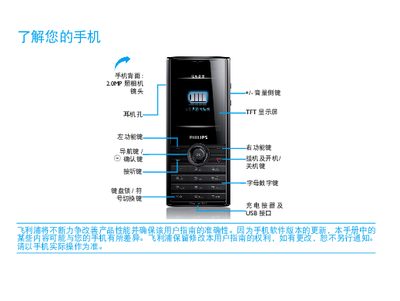
This guide explains how to install the SIM card, charge the battery, and use accessories such as the Micro‑SD card and USB cable. It also covers connecting the phone to a computer with the Mobile Phone Tools software for data synchronization.
Additional sections describe shortcut menu configuration, key functions, network indicators (GSM, GPRS, Bluetooth), personalization settings, and tips for optimizing battery performance and safe usage. This manual is written in Chinese.
| Camera | 2.0 MP |
|---|---|
| Display | TFT |
| Network | GSM |
| Data Network | GPRS |
| Bluetooth | Enabled |
| Memory Card Slot | Micro SD |