
This is a user guide for Philips mobile phone, the model is 5.0MP. This user guide includes instructions on how to turn on/off the phone, unlock/lock the screen, make a call, answer a call, etc.
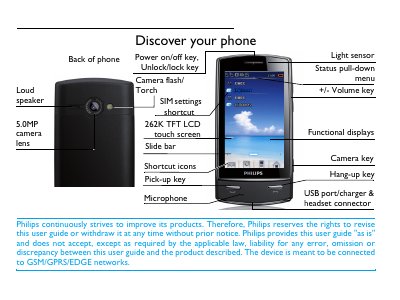
This guide covers everything you need to start using the Philips Xenium X806, from inserting the SIM and battery to configuring the display and sensors. It explains how to navigate the menu, use the QWERTY, alphanumeric, or handwriting input methods, and access shortcuts for calls, messaging, and multimedia.
Later sections describe tools such as the calendar, alarm, world clock, and calculator, as well as warranty information and regulatory compliance. The manual also includes a declaration of conformity for the device’s radio and safety standards.
| Camera | 5.0 MP |
|---|---|
| Display | 262K TFT LCD touch screen |
| Network | GSM/GPRS/EDGE |
| SIM slots | Dual (slot1 and slot2) |
| Memory card | Micro‑SD card slot |
| Sensors | Light sensor and motion sensor |
| Charging | USB port/charger |
Press and hold the power on/off key on the top of the phone.
When the phone rings, turn the phone over (front side to back or back side to front) to mute the ringtone.
The first time you switch on the phone you will be prompted to calibrate the stylus, or you can calibrate later via Settings > General > Pen calibration.