
Philips phone user guide, introducing the operation of the phone's buttons, standby screen, quick icons, desktop widgets, as well as the icons and symbols on the display screen. Reminding users that software updates may cause differences between the guide and the actual phone.
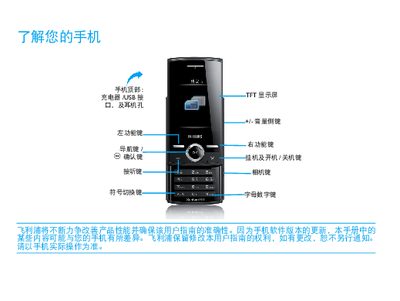
This manual explains how to install the SIM card, charge the battery, and configure basic functions of the Philips Xenium X516 smartphone. It covers the standby screen, widget management, and common settings such as Bluetooth, Wi‑Fi, and calendar.
Additional sections describe battery‑optimization tips, safety precautions, and regulatory information, including SAR limits and RoHS compliance. The guide also provides instructions for syncing data with a computer using the supplied USB cable and software. This manual is written in Chinese.
| SAR value | 4.467 W/kg |
|---|---|
| Network support | GPRS |
| Battery type | Removable, rechargeable |
Turn off the phone, remove the battery cover, then insert the SIM card as shown in the manual.
Connect the charger until the battery is fully charged; once fully charged, disconnect the charger to avoid over‑charging.
Tap the widget icon on the standby screen to open the widget menu.
Disable unused features such as Bluetooth, Wi‑Fi, GPS, and use the appropriate scenario mode to extend battery life.