
Key facts
- Brand
- Zebra
- Model
- ZT210/ZT220/ZT230
- Category
- Printer
- Industry
- Electronics
- Documents
- 2
- Languages
- ZH
- Last added
- 2026-11-16
Start here
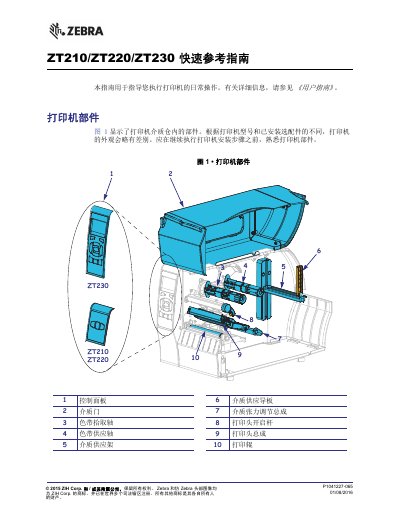
Zebra ZT210/ZT220/ZT230 Printer Quick Reference Guide
This document serves as a quick reference guide for the daily operation of the Zebra ZT210, ZT220, and ZT230 printers. It covers essential topics such as identifying printer components, understanding control panel indicators, and preparing the device for use.
The guide details step-by-step procedures for installing ribbons and media, connecting the printer to a computer via various ports (USB, Serial, Ethernet), and performing initial setup tasks like printing configuration labels. This manual is written in Chinese.
Zebra ZT210/ZT220/ZT230 specifications
| General Specifications | See Section 6 |
|---|---|
| Printing Specifications | See Section 6 |
| Ribbon Specifications | See Section 6 |
| Media Specifications | See Section 6 |
All Zebra ZT210/ZT220/ZT230 documents by type
Day-to-day operation, settings and troubleshooting. Start here if the product is already set up.
The shortest path to a working setup, usually only a few pages.
Questions answered in these manuals
How do I perform a FEED self test?
Print a configuration label, turn off the printer, press and hold FEED while turning it on, and let it print labels at different speeds and darkness settings to determine optimal print quality.
What use environments are these printers intended for?
They are for home, office, commercial, and industrial use.