
Key facts
- Brand
- Zebra
- Model
- ZD888T
- Category
- Printer
- Industry
- Industrial
- Documents
- 2
- Languages
- ZH
- Last added
- 2026-10-22
Start here
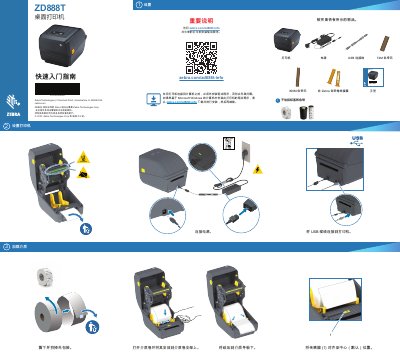
Zebra ZD888T Printer Quick Start Guide
This document serves as a quick start guide for the Zebra ZD888T printer. It outlines the necessary steps to prepare the device for use, including installing the required drivers on a computer before connecting the USB cable and power. The guide also details the process for loading media and the ribbon cartridge. This manual is written in Chinese.
Read onlineZebra ZD888T specifications
| Max Print Speed | 152.4 mm/s (6 ips) |
|---|---|
| Print Density | 203 dpi |
| Interface | USB 2.0 |
All Zebra ZD888T documents by type
The shortest path to a working setup, usually only a few pages.
Day-to-day operation, settings and troubleshooting. Start here if the product is already set up.
Questions answered in these manuals
What must be done before connecting the printer to a computer?
You must install the printer drivers before connecting the printer to a computer.
How do you load a paper roll onto the printer?
Open the media roll and place it onto the media roll holder.
What programming languages does the ZD888 support?
The printer supports ZPL™ and EPL Zebra printer programming languages.
What is the maximum media outer diameter supported?
The printer supports media rolls with an outer diameter up to 127 mm (5 in).