
Key facts
- Brand
- Yamaha
- Model
- N-100
- Documents
- 2
- Languages
- EN
- Last added
- 2012-06-12
Start here
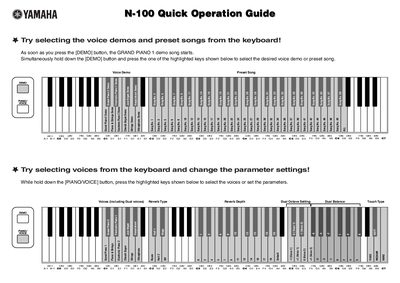
Yamaha N-100 Quick Operation Guide
This document serves as a Quick Operation Guide for the Yamaha N-100 digital musical instrument. It provides instructions on how to select voice demos and preset songs using the [DEMO] button and specific keys. Users can also select different voices and adjust parameters such as reverb type, dual octave settings, and touch type while holding the [PIANO/VOICE] button.
Read onlineAll Yamaha N-100 documents by type
The shortest path to a working setup, usually only a few pages.
Questions answered in these manuals
How do you start the Grand Piano 1 demo song?
Press the [DEMO] button to immediately start the GRAND PIANO 1 demo song.
How do you select a specific voice demo or preset song?
Hold down the [DEMO] button and press one of the highlighted keys to select the desired voice demo or preset song.
How do I select a voice demo or preset song?
Press the [DEMO] button, then simultaneously hold it down and press one of the highlighted keys to select the desired demo or song.
How do I change the transpose setting?
Hold down both the [DEMO] and [PIANO/VOICE] buttons and press the highlighted keys to change the desired parameter setting.