
Key facts
- Brand
- Yamaha
- Model
- V922820
- Category
- Musical instruments
- Industry
- Electronics
- Documents
- 2
- Languages
- EN
- Last added
- 2012-06-11
Start here
Yamaha V922820 Quick Operation Guide
User Manual 2 pages · 81 KB · EN
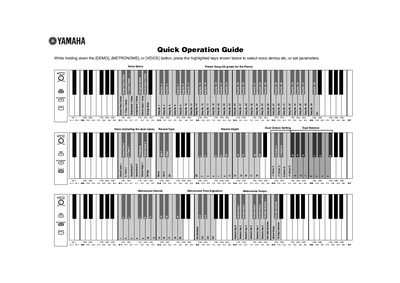
This Quick Operation Guide provides instructions for the Yamaha V922820 digital musical instrument. It details how to select voice demos, including a preset song for the piano, and how to adjust various parameters while holding down specific keys.
Read onlineAll Yamaha V922820 documents by type
User Manual 2
Day-to-day operation, settings and troubleshooting. Start here if the product is already set up.
Questions answered in these manuals
How do I select a voice demo preset song?
While holding down the [DEMO], [METRONOME], or [VOICE] button, press the highlighted keys to select the voice demo.
What is the standard pitch setting?
The standard pitch is set to 440.0 Hz.
How do I select voice demos?
While holding down the [DEMO], [METRONOME], or [VOICE] button, press the highlighted keys shown below to select voice demos etc.
What is the standard pitch setting?
The standard pitch is set to 440.0 Hz.