
This is the owner's manual of YAMAHA N-100 Digital Piano
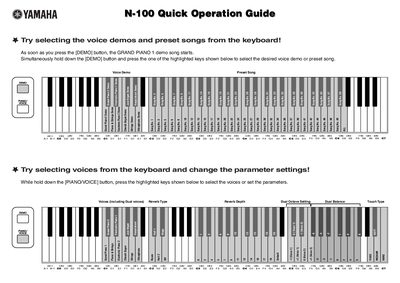
This document serves as a Quick Operation Guide for the Yamaha N-100 digital keyboard. It provides instructions on how to select voice demos and preset songs using the [DEMO] button and specific keys. Users can also select various voices, including Dual voices, and adjust parameters such as Reverb Type, Reverb Depth, and Touch Type.
Press the [DEMO] button, then simultaneously hold it down and press one of the highlighted keys to select the desired demo or song.
Hold down both the [DEMO] and [PIANO/VOICE] buttons and press the highlighted keys to change the desired parameter setting.
Hold down the highlighted keys at the far left of the keyboard and press the highlighted keys in the center to raise or lower the pitch.