
Key facts
- Brand
- SONY
- Model
- SCPH-1000R
- Category
- Game
- Industry
- Electronics
- Documents
- 2
- Languages
- ZH
- Last added
- 2026-10-22
Start here
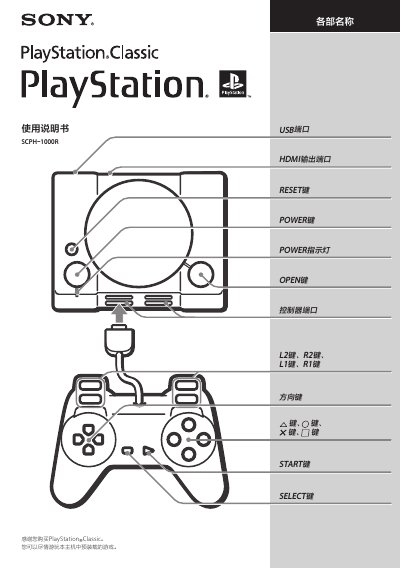
Sony PlayStation Classic SCPH-1000R User Manual
This document is the user manual for the Sony PlayStation Classic SCPH-1000R. It details the console's physical layout, including ports and buttons, and outlines the specific games preloaded on the device. The manual emphasizes that only the included controller is compatible and that no external storage devices or other game discs are supported.
The guide covers essential safety precautions, such as avoiding overheating by ensuring proper ventilation and keeping the device away from water. It also provides step-by-step instructions for connecting the HDMI and USB cables, powering on the system, and navigating the main menu to start games, save data, and manage resume points. This manual is written in Chinese.
Sony SCPH-1000R specifications
| Video output | 720p, 480p |
|---|---|
| Audio output | Linear PCM |
| HDMI output | HDMI™ |
| USB port | Micro‑B |
| Power input | 5 V 1.0 A (USB‑A) |
| Maximum power consumption | 5 W |
| Dimensions (W×H×D) | 149 mm × 33 mm × 105 mm |
| Operating temperature | 5 °C ~ 35 °C |
All Sony SCPH-1000R documents by type
Day-to-day operation, settings and troubleshooting. Start here if the product is already set up.
Questions answered in these manuals
How do I turn on the PlayStation Classic?
Connect the HDMI cable, plug in the USB power adapter, then press the POWER button; the POWER indicator will turn green when the console starts.
What kind of power adapter is required?
A USB AC adapter that supports 5 V 1.0 A output (USB‑A type) must be used; other adapters are not guaranteed to work.