
The Sony PlayStation Classic SCPH-1000R user manual provides safety warnings, setup instructions, operation guidance, and specifications.
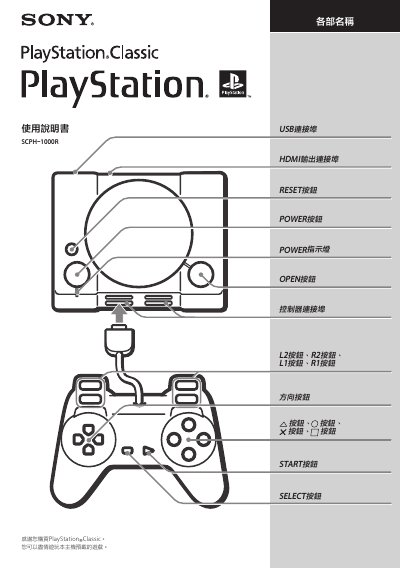
This manual explains how to safely set up and operate the PlayStation Classic console, including connecting HDMI, powering the unit with a 5 V 1 A USB adapter, and using the supplied controller. It also covers safety precautions, cleaning, and troubleshooting steps such as handling overheating.
Technical specifications are listed, covering video and audio output formats, power requirements, dimensions, weight, and operating temperature ranges. Warranty and support information are provided at the end of the document. This manual is written in Chinese.
| Video output | 720p, 480p |
|---|---|
| Audio output | Linear PCM |
| HDMI output | HDMI™ |
| USB port | Micro‑B |
| Power input | 5 V 1.0 A (USB‑A) |
| Maximum power consumption | 5 W |
| Dimensions (W×H×D) | 149 mm × 33 mm × 105 mm |
| Operating temperature | 5 °C ~ 35 °C |
Connect the HDMI cable, plug in the USB power adapter, then press the POWER button; the POWER indicator will turn green when the console starts.
A USB AC adapter that supports 5 V 1.0 A output (USB‑A type) must be used; other adapters are not guaranteed to work.